My new laptop will arrive on 18-03-2013!

Well, since Windows 8 became available, I wanted to create Metro applications in Visual Studio. Unfortunately, there’s a challenge with that. To create Windows 8 Metro applications, you’ll need to run Visual Studio 2012 on a Windows 8 machine. And my trusted desktop system is running Windows 7. So I had to consider if I wanted to upgrade my desktop or not. I decided not to upgrade but pick the next-best option: buy a new computer! And here are its specifications, straight from the invoice:

210-40039 Alienware M17x : Standard Base 1 3.089,91 3.089,91 SR
203-33091 N00W7M01
338-16739 Processor : 3rd Generation Intel Core i7-3740QM (6MB Cache, up to 3.7GHz w/ Turbo Boost 2.0)
230-12514 Display : 17.3" 120Hz w/ 3D Bundle WideFHD (1920 x 1080) WLED LCD
319-10808 Camera : Integrated FullHD Camera with dual digital microphones (Win 8)
320-12434 LCD Back Cover : Soft Touch 3D - Stealth Black
340-29243 Ship Accessory : Western Europe Docs (EN, FR, IT, GER, DUT)
340-29315 Placemats : Placemats (Eng, Fre, Ger, Ita, Dut)
340-31186 MOD,SW,MY-DELL,3.X
370-22691 Memory: 32768MB 1600MHz Dual Channel DDR3 (4x8GB)
400-26583 Hard Drive : 128GB mSATA Boot Drive + 750GB 7,200rpm SATA 3Gb/s
429-16657 Optical Drive : BluRay Combo (Blu-ray read only, DVD, CD read & write)
450-13573 Power Cord : Euro 250V
450-16348 Power Supply : Alienware 240W AC Adapter
451-11606 Battery : Primary 9-cell 93W/HR LI-ION
490-14104 Graphics : 2GB GDDR5 NVIDIA GeForce GTX 675M
510-10451 Sound Card : Creative Sound Blaster Recon3Di with THX TruStudio Pro Software
555-14415 Wireless : Intel 2230 Wireless Card + BT
583-16264 Keyboard : Internal US/International Qwerty Keyboard
619-38677 Operating System : Windows 8 Pro 64bit, Dutch
620-13866 Os Media : Windows 8 64bit, MUI Resource DVD
630-AALP Software: MUI Microsoft Office Home & Student 2013, EMEA
644-10055 Avatar : Avatar not included
650-14174 Anti Virus : Not Included
654-10009 TimeZone : (GMT + 00.00) Dublin, Edinburgh, Lisbon, London
656-10018 AlienFX Colour : Quasar Blue
754-56825 Standard Service - 1 year of Next Business Day coverage included with your PC
754-81457 INFO 1 Year NBD with Premium Phone Support
754-81459 3 Years NBD with Premium Phone Support

Yeah, I know. It’s a monster. Then again, when I bought my desktop in 2008, it too was a huge monster and it’s still a very powerful system. Sure, it’s price is expensive but it’s a system that will be heavily used by me for the next 5 years or so. It’s not going to replace my desktop but it will allow me to create Windows 8 applications while keeping my desktop intact. And yes, AlienWare is now owned by Dell, but so what? My desktop is a Dell too, and they’re selling great systems, although a bit expensive.

So, what will I do with it? Well, I will install a bunch of software on it. To start with, Visual Studio 2012 and Embarcadero Delphi XE3 so I can develop new applications. Also included will be Altova MissionKit which is practical for managing XML files, schema’s and style sheets. For my CGI hobby I will also install E-On’s Vue 11 and SmithMicro’s Poser Pro since this system will be powerful enough to handle this kind of image rendering. And of course I will include a bunch of other practical tools and applications. I’ll most likely install Alcohol 120% on it, which will allow me to copy a CD-ROM to disk and then play games directly from it. Not many games, though. Just the ones I’d like to play when I’m on a holiday or so.

I hope this purchase will make me an even better software engineer but I also hope to have a lot of fun with it. That’s not too difficult when you consider developing software as “fun”. 🙂

An interesting sub-project.

While working on my WordChain project (See post “The Wordchain data model.“) I reminded myself that I might have a simple problem when I have to deal with images. Since the WordChain project uses simple routing for each word, any link is most likely being translated to a word. This would require me to use a special route for images. But another problem that arose is the storage requirements, which would increase enormously if I would add a lot of images. And storage of such images in e.g. a Microsoft Azure environment would make hosting a bit more expensive.

The solution here would be using a separate host for just the images, and store the URLs to those images within WordChain. This will allow me to use a cheap data store for the images and a bit more expensive host, like Azure, for the WordChain website.

But it also means that I will have to think of a solution to host the images somewhere, and write a simple project that will serve these images to wherever I want to use them. These images should be divided into categories and preferably some more information needs to be added to keep track of the author, original source, license and whatever else could be interesting. It could grow to some interesting gallery application that could be used to serve images to several other websites.

So here’s a new project that I want to design. And again, I will need to start designing things. However, this time I can’t start with the user interface, since the user interface would just give the image. I need to design the tool that will allow me to upload images to the host, including the other data that I want to be part of it.

The Wordchain data model.

In my post “Project born from pain…” I’ve started a new project, which now has the name ‘WordChain’. It basically chains words together. In my post “The first design of “WordChain”…” I worked out the first design of this project, with pen and paper. And now it’s about time to consider the data model for this project, which will be the most important part of the project. And to do this, I will have to look back at the design…

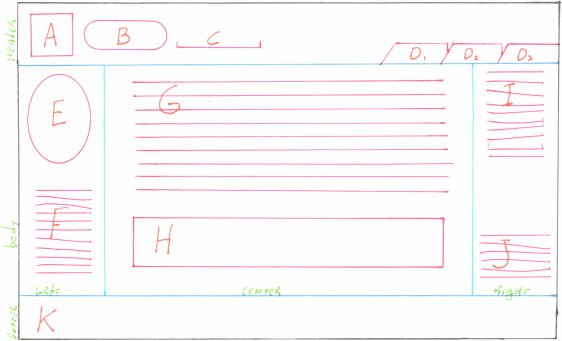
WordChain screenThe design has several areas that I’ve marked with letters. As it turns out, I detect 11 different items which indicates things aren’t going to be very complex. Some of this data is from the configuration while other data is from the database. And perhaps some data is a mixture.

So, back to the root of the project. The user selects a word and something about that word will be displayed. The word will be shown in B and is related to the description in G and the image in H. However, other words can also be related to the same description so we have an m:1 relationship between word B and C and description G. Each word has just one description, but descriptions have multiple words.

Description G will have a main image and possible other images that are shown in J. Since these images are most likely shared with other descriptions we have an m:1 relationship between description G and image H but an m:n relationship between description G and image J. Each description will have one main description and multiple other images while every image will have multiple descriptions.

The description will most likely relate to other words in the system, but those words would lead to other descriptions. Or they will lead to external sites. These words are most likely part of the description and will be part of other descriptions too. So we have a second m:n relationship between description G and word E and F.

The phrases in I would be ‘special’ words so they would have their own description. They should not be shown as aliases in C nor as words in E and F.

We also have the icon A but that should be part of the configuration, just like the footer K. But the icon A might be overridden by the description. So the description should include a reference to an icon.

And we have the tabs D and these are also part of the configuration. They will link directly to a specific word. Also keep in mind that the root page must also default to a specific word to be displayed, else the visitor has no starting point. This default will be considered an “invisible” tab, but technically we can link to it from icon A, making the icon the first of all tabs.

So we have A, D and K being part of the configuration. A would be a URL, D would be a list of words and K is an HTML formatted text. Next we have words and phrases B, C, E, F and I that are linked to description G through two different connections. One will indicate the description that describes the word, the other is for related words for a specific description. Finally we have the images H and J that are linked again to the description G.

This means we have a Word table for B, C, E, F and I, an Image table for H and J and a description table for G. And we have a configuration record for the default (root) word, icon A, tabs D and footer K. And in the background three tables to connect word to description, description to word and description to image for the multiple relationships.

As it turns out, this is a simple datamodel. However, words and phrases aren’t identical and must be treated differently. In an object model, this could be done by creating a base class and derive a Word class and a Phrase class. The base class would support the relations with the description and the child class determines where it will be shown.

A base class for description would also be practical since that would allow me to create more special descriptions like input forms and whatever else I’d like. This is something I will keep in mind for the future.

A base class for images would allow me to make sub classes if I want to add videos, music or other media. So that will be my third base class.

And with this information I can start Visual Studio and create the Entity Framework model. But that will have to wait since my back is killing me again…

The first design of “WordChain”…

In my post named “Project born from pain…” I’ve talked about a simple project I want to create. Why? Because I’ve injured my back and just lying in bed or sitting around isn’t me. I need to do something useful while my back is healing again. My regular work is a bit out of the question since I can’t focus much at this moment. Pain makes it difficult to concentrate. However, ideas still fill my head and a simple design can be created with something simple like pen and paper. So I started my design just like that!

People tend to confuse things like software programming and software design. When you’re designing software, you will have to start with drawing all kinds of schematics depicting what you want, what you need and what it should look like. And these days people just start opening their favorite UML modelling tool or just start their development software and they start designing. But this early in a project it’s just easier to draw things with pen and paper and just forget the limitation that software would imply upon your design. You need to visualize what you want before trying to make it fit within a proper design model. People often forget this.

And how about programming? Programming is about just three things: steps, decisions and jumps. Nothing more, nothing less. Steps are the actions you take, like assigning a value to a variable. Decisions are conditional statements like “if” and “switch” that make you choose which direction you will continue to step. And jumps are to skip parts of code, most often used combined with a condition to either skip a few steps or to repeat a few steps. Once you master these things, you’re a programmer. Then again, you will need the skills to translate designs into these three things…

So, I’m still taking the first steps, which means I’m a designer now, not a programmer. I needed to create a working title for this project and “WordChain” sounds just right. Why? Because the purpose of this project is to chain definitions of words together. You start with one word, which is defined on the screen and which links to related words. Those related words link to more words and the result is a large collection of related words describing whatever I want to describe.

And it’s practical use? Well, it could be used as a manual for some product. You start with the product and the linked words will bring you to related topics. Or you use it to create a simple encyclopedia. Or maybe even a diary, where each word related to a new thing you’ve done. The options are plenty and it would be nice if WordChain would be available from its own website, explaining itself.

So let’s start with the drawing I just made. Just with pen and paper, in multiple colors. I’ve scanned it as a “Portable Network Graphic” file and reduced the colors to 256 colors to cut the file size.
WordChain screenYeah, I could have opened Visual Studio, create a simple HTML file to make the same drawing and posted that instead. But creating this with pen and paper took less than ten minutes and did not need me to consider any limitations of HTML or whatever else. I want something that looks like this, and this early in the project I just don’t want any restrictions, since that stifles creativity.

The screen has three large sections. A header containing parts A, B, C and D. A footer containing part K. And a body that’s divided into three subsections. The left subsection contains parts E and F. The right subsection contains parts I and J. The center subsection contains parts G and H. And technically speaking, part D and it’s three sub-parts should be seen as part of the body, but they just stick within the header part.

So, what are these parts?

A is a simple icon that’s either the default icon for the whole site or it’s overridden by the specific topic.

B is the selected word. This would also appear in the URL of the web browser.

C shows a few aliases for this specific word that all share the same definition. We shouldn’t display too many aliases though.

D are tabs for predefined words that we always want to show. Think, for example, about a “Help”, “About” or “Home” tab. These should be visible as tabs and should just link to these specific words in the system.

E is a word cloud, displaying related words in different sizes which the visitor can select. I’m not sure which condition should decide the word size, but the amount of words shown should be limited.

F is a list of hyperlinks that open a new browser window when clicked. In this new window, some external website would be shown. For example, F might contain the word “Blog” and clicking on it would open my weblog. Blog might also appear in E but if I click there, I would just see the definition of this word, and perhaps a few links to other blogs will appear under F.

G is the description of the word, as HTML formatted text. There should not be many restrictions to this, although I prefer to limit the HTML options to simple formatting options, just like WordPress is doing.

H is an image that’s related to the word. Although the HTML format would allow me to include images within the description of G, a separate area for a topic-related image would be nice here. I would probably need to change the positions of G and H, though. Because H would imply it’s an image topic, not a word topic. The image would be more important, thus it should be on top. The description would then be optional, and below the image.

I is a list of phrases leading to other topics, just like the word cloud in E would do. The difference between E and I is that E would be single words, while I has complete phrases like “Who is Wim?” or “What does Wim do?” for a topic about the word “Wim”. (Which happens to be my name.) Phrases would be used to offer more information about a single word.

J has a list of images related to the specific word, and they would open within a new browser window. These images will be internal images that are linked to the specific word. The URL of these images would start with the word, followed by a slash and the name of the image. Images can be shared between words, but these links between words and images need to be created in the setup before they appear here.

K is the footer and can be anything in HTML format. The footer will never change and most likely contain some copyright information, useful links and whatever else you want to display on every page. For example, in Europe there’s some dumb cookie law and you could use this footer to display a warning that your site might use cookies.

With these parts now designed, it’s time to consider the whole project model. And again, pen and paper are very practical…
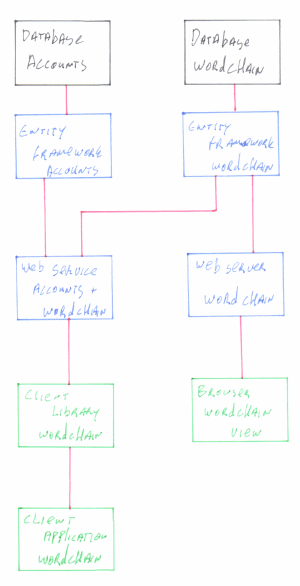
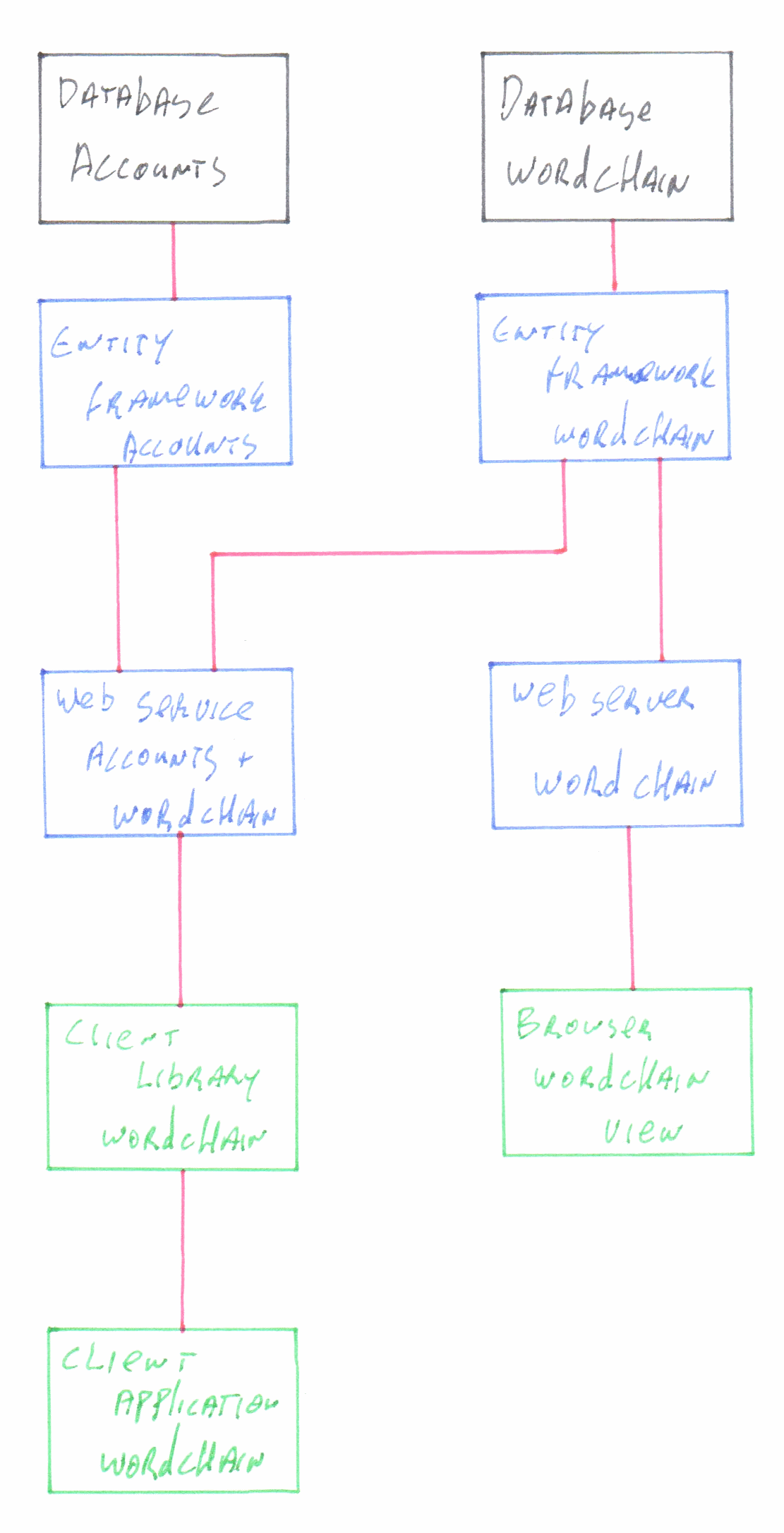
WordChain modelThis model is quite simple, actually. I have two database models. One is for the user account management, since the setup application is most likely going to need me to log in before I can make any changes. The other is for the WordChain data itself and it’s something I will define in my next step.

While user management is also important, it’s more a background task which can be delayed until later. Creating and filling the WordChain database will allow me to set up the site very quickly without any need for users. This delay in design allows me to consider all kinds of solutions.

Since I have two databases, I also need two models within my .NET code. Since I’m using Visual Studio, these will be Entity Framework models. And yes, for now I will consider using the Entity Framework to manage the user accounts, but this is still something I might redesign in the future. It’s just there so I won’t forget about it.

Next, I have a web server that connects to the WordChain model. This just uses the read-only methods that are provided by the model, although there might be some write-actions if I want to keep track of the most popular words. (E.g. by maintaining a counter for every word that is requested.)

The web server will be accessed from a web browser and thus every visitor can start moving around the big list of words that I will create in the database.

On the other side I have a web service which connects to both the WordChain database and the User Account database. Here we will manage the log in options and allow users to change the content of the WordChain database based upon their access rights. This is a web service and not a web site, thus allowing me to write all kinds of applications to connect to this all. This would allow me to e.g. create an Android application that allows me to manage the whole system, instead of the need to do everything within HTML. It provides more flexibility to manage the data. Still, if I want I can still build a web site that invokes this service.

The web service would need me to generate a client library to invoke this service. This library would need to handle the log in and all data retrieval and manipulations. I probably need to create multiple libraries for multiple development environments but for now I’ll just keep it simple. And “simple” means that I will just create a .NET assembly and import the web service reference as starting point, thus allowing me to consider my exact needs.

The client library will by itself be used again by some client application. My goal is to mix multiple technologies so I’m considering to build this client in Delphi or in Oxygene. But this is still far, far away since the design of the web server is more important. For now, I could just simply manage the test data using SQL scripts…

So, where to go now? Well, I need the WordChain database and model, so I would need to open Visual Studio and design this all model-first. The Entity Framework will in its turn generate the SQL script I need to create the database. I can then create several test applications that will generate some data to test my model, fill it with stuff and do some basic manipulations. These will be my test cases.

Once this is done, I can design the web site itself, which would be a simple MVC application with a simple layout and two routing options. One routing option which just has a word, which results in a page. And one which has a word and an image name, which results in just an image.

But first the data model, which again will need me to start making notes, with pen and paper. I need to look at the first image, decide which data I need and how things will need to relate to one another. Once done, that model can be translated to an Entity Framework model.

Project born from pain…

It was February 14, 2013. I had the flu, but needed medicines for my Diabetes. So I had no choice, took my car to drive the 800 meters (!) from home to the apothecary to pick them up. It was snowing a bit, the streets were slippery because and well.. My car just made sure that I did not have to walk over 800 meters of slippery, icy streets. Just about 20 meters.

It did not work. I slipped and badly injured my back while I tried to get back into the car after picking up my medicines. I managed to stand up reasonably quickly, which assured me that I had not broken anything severe, but the pain… The pain…

I’ve started this project on Sunday, four days later. The pain is still there and my physician subscribed Paracetamol 1.000 mg and Ibuprofen 600 mg, three times per day. That’s probably enough to sedate a horse, but I still feel the pain. To make it worse, it just hurts most when I try to stand or sit, although standing or sitting quietly will bring the pain down again. So here I am, sitting at my computer, trying to deal with the pain and making my mind wonder about what to do. Still, as times passes by, I do manage to handle the pain better.

Well, that’s not too difficult. I’m just going to create a new project which I would consider practical and educational. I don’t know how much time it will take to finish but that’s no big deal since I’m not going anywhere. But first, what should the project be?

Well, after considering how Wikipedia and Twitter work, I think it would be nice to have something with similar, practical usage. A website that links words and phrases together by hyperlinks and short texts. This could even be expanded by adding images, video and other content, as long as things are kept short. I am thinking about a header with an icon and title, a few special tabs on the right side for specific topics and beneath the title the working area. Below the working area there would be a footer with copyright information and other stuff about the site itself.

The working area would be divided into three parts. A left column containing a word cloud showing the mostly related words to the current topic, with a list of links below for outside references to other websites. The right column would contain short phrases which would also lead to other topics, plus a list of related meta-data like images, videos, documents and other stuff. The center part would be the main content and would contain a short description, possibly with a small image or video included. This content area might also contain an input-form so visitors can offer their own data here.

This would be a perfect web site to create using Visual Studio 2012 with MVC 4. Plus the entity framework for storage. However, there is another challenge: how to fill it with data? And for this, I decided on a reasonable unique concept: a second website! Why? Because I want the main website to be read-only. A root domain name followed by the word that needs to be looked up, nothing more. I have no use for a “/setup” or “/admin” path because that would mean I could not use the words “setup” or “admin” as descriptions. A second site that would share the same database would be more practical.

But two sites means using two (sub)domains. But that’s not a big problem. All I need to do first is add those two sub domains to my current domain. So I go to my domain registrar and add two A labels to my DNS settings. I want to create word.wimtenbrink.nl for the site itself and wordsetup.wimtenbrink.nl for the configuration site. And I need to tell IIS on my web server to start hosting those sites, even if they’re not doing anything. It will take some time for the DNS system to actually find my sites but by reserving the domain names already, I have one delay less once I really need to start testing in a production environment.

Then again, this production environment is still experimental. If the project is finally finished, the real version will be hosted somewhere else. Most likely under Microsoft Azure or a RackSpace cloud. Why? Because my simple web server at home won’t be able to handle more than a few requests per minute.

Now I have the whole hosting solution ready so it’s time to design a few things. I start with the user interface of the site itself. This should tell me the data that I will need to store. And this can simply be drawn with pen and paper. Once the design is done, I need to consider the data that I see within my design and how to store it all. Storage would end up in an SQL Server database plus a small bit within the configuration file of the project. Once storage is done, I need to think of a web service that will allow me access to this data, and I would need to do that one twice. Once for read-only access for the site itself and once with read/write options for the setup. (And the reading part would be shared between both.) Once the web service is set up, I can start designing the user interfaces. The site itself will use MVC 4 and ASP.NET with C# as the programming language. The setup is something that I want to be a challenge so I’m considering to write it as a client/server desktop application and possibly port it to Android using Delphi or Oxygene.

All in all, this project will thus have the following steps, which I will elaborate in some next posts:

  1. Design the user interface on paper. Scan it, add some descriptions to it and make a functional design.
  2. Consider all data that needs to be stored, create a database structure by generating an Entity Framework model around the data.
  3. Define the web service methods that I need and find a simple way to share all read methods between two different websites.
  4. Create the user interface for the web site. Use a simple SQL script to fill it with some dummy data.
  5. Build the setup application using whatever technique is most appropriate.

And yes, this is a waterfall technique. If I was more than one person, Scrum could be very useful since multiple me’s could work on each separate thing. Since I want to create it all by myself, doing it step by step will be good enough.

And now back to bed. It took three days to write this all with all the pain in my back. At least in bed I can easily hold the pen and paper and do the first step…

Code quality with NDepend

In the ICT branch, quality tends to be overlooked. Plenty of products need regular updates and patches to fix problems in the existing code. Problem is that the software market has many software developers who don’t have a good grasp on the concept of quality, because they’re afraid that writing quality code will slow them down. Quality tends to be difficult, hard to understand. While writing programs is quite easy, since all you do is tell a computer what to do in a language the computer will understand.

One of the things that will always annoy me is when I see a project created by someone else, and it works great yet the code is an unreadable mess of Jibber-jabber. And often it’s caused because multiple people have added code to it, each and everyone in their own style and based on their own knowledge. And some of them are very good at their work, while others are bad. And even when a project started with some great code at first, all changes and updates just tend to make it too complex. And often it’s just because of deadlines or inexperience that code becomes bad. Or the lack of courage among developers to just throw away bad code and completely rewrite it using a better style and technique.

When I was developing in Delphi (which is still a hobby of mine) I had Peganza’s Pascal Analyzer available to help me tell about the status of the code. And although the Delphi compiler would just tell me about errors and warnings, those weren’t just enough to find the code quality. Because badly written code could still compile without warnings and errors. So I used the analyzer to tell me where I needed to re-factor the code to improve its quality.

So I wanted something similar to use with Visual Studio and C#. And although VS2012 offers its own analysis tools, they didn’t show me very much information. I discovered that I had to select a set of rules first, so I did. I chose the “Extended Design guidelines” and it gave me a few more warnings about my code. I have to avoid namespaces with just a few types, I need to validate the arguments of public methods. And I needed to mark a member as static. Too bad that the code I’ve used started as a generated project by Visual Studio itself. All I did was add a bit of meat to its bones, but the meat wasn’t the problem. The bones were…

So Microsoft’s own analysis complains about Microsoft’s own templates. I see. Yeah. Hum.

The next in line is Resharper, and Resharper doesn’t just analyse code, it also makes suggestions while typing and can even correct things on a simple mouse-click. Resharper is great when you want to re-factor your code and even analyses JavaScript code and other languages. It’s a great tool to fix things, but if you need to fix things, it means you’ve broken something first. And generally, when something is fixed you would prefer to have an immediate warning when your code starts to “smell” again, so you can do a rollback and tell the person responsible to do a better job. You don’t want to fix things at the end of a sprint when things start to smell bad. You want warnings sooner, when the project is built by one of the developers in your team. And basically, you want a report telling you about the current quality of the project, which you could show to clients and use to compliment your team on their good work. (Or to bash some heads when to do it badly.)

So, NDepend… It’s a bit expensive but for those who use a special build server to make new, daily builds based upon the latest code it is also a practical solution. It allows you to define your own set of rules based upon a query language that’s based upon LINQ. And it gave me plenty of warnings on my little project that are actually a bit more helpful than those VS2012 or Resharper gave me. It advised me to re-factor one complex method, which was indeed a bit too complex. It told me to make some classes ‘sealed’ since I’m not inheriting from them. Practical, since I wasn’t planning to inherit from these anyways. Some funny warning about a namespace without types, which isn’t very practical. Unfortunately, this default rule didn’t tell me which namespace it was or where it’s located so I have to search a bit. And a warning that I should avoid defining multiple types in a single source file. And indeed, I had declared three types in a single file, which isn’t good practice. Then again, this file was auto-generated too…

As it turns out, this simple project of mine didn’t have a lot of issues. But some large solutions that I’ve worked on do have plenty to report and the analyzer makes it very clear that maintaining solutions for over 7 years without regular quality check-ups on code do collect a lot of stink. I already knew some of those solutions were bad, but the analyzer made it even look horrible, almost unable to tell about all the smelly parts. It would take months to just fix those smelly parts and thus cleaning it up becomes a bit too expensive. You wouldn’t need a tool that tells you it smells, you’d need a tool that cleans it up. So for those big solutions, Resharper and common sense would be better.

I also decided to use it on a solution that I’ve worked upon myself, just curious about the amount of code smell in that solution, compared to some of the other large solutions I’ve seen. And I wasn’t surprised about the fact that it would have plenty of warnings. And it did. My small project only violated 13 rules while a large solution that I have had broken 86 rules. My solution broke 71 rules… So, almost as bad as the big ones, until I started to check the number of times each rule was violated. In my solution, I made perhaps a dozen violations for things that I consider important up to 3302 methods that could have had a lower visibility. Lowering visibility on those methods it mentioned isn’t that important to me, so those I won’t even fix. But the other big solutions I’ve analyzed had more than 100 violations per rule with only a few exceptions. Several rules had over a thousand violations with one rule having more than 12.000 violations. I would almost feel sorry for those who have to support that!

So, NDepend tells me my code stinks. Does it tell me even more? Yes, it does! It provides practical statistics about my code, displaying all namespaces and types but also the dependencies between the assemblies within a solution. And it shows the dead code within my solution. I had one dead method, that was actually part of a third-party component.

NDepend gets it power from the ability to create new rules, to group rules together and in the fact that it generates an HTML report that you could share among all developers, your managers and CEO and perhaps even send to customers who want to check if you’re making quality software. It can help you to improve your code but its main purpose is to tell you the quality of your code. It gives you a challenge. The challenge to rewrite your solution so it won’t have anything to warn you about. Once you’re at that point, NDepend could become part of your build process to make sure your code maintains such a high quality.

So, would you need NDepend in your tool collection? Is it worth the price you’d have to pay for it, or is it too expensive?

Well, for me as a single developer it’s practical since it challenges me to write code that creates no warnings. And this can be a real tough challenge when you’re working on complex solutions. But my personal budget is reasonable big, thus allowing me to make a few large expenses and probably even allows me to overpay a bit. It is an expensive product and I would recommend to first buy a Resharper license before considering buying NDepend. As long as Resharper tells you about code smell, you’re still in need of learning better design practices.

For a team of professional developers it is basically the same as for single developers. However, teams of developers will need reports telling them if the quality of the code is improving or not. You need to depend on the others in your team, and often you will lack the time to do a code review on the work of each team member. For teams of developers I would recommend to use NDepend if you, as a team, want to improve the code quality and are willing to check reports on the code quality with every new build. A license for your build server would be most practical in that case, especially when the build server will do regular (daily) builds automatically.

When your job is doing code reviews, you might want to use the build-in analyzer of VS2012 or Resharper but those are more meant to allow developers to fix code immediately. Code reviewing isn’t just meant to improve code, but is meant to improve developers. When you’re doing regular code reviews, NDepend would be very useful to do a lot of work for you. You would have to write your own rules and change several of the existing rules that NDepend provides, but it will help you to review the works of others.

If you’re a manager in an ICT department then reviewing code will probably be a bit complex. However, you would still need to know about the code quality and the quality of the team of developers. Here, too, a license for the build server would be practical to keep you informed about the health of your product and to take steps when your developers start adding smelly code. Especially when you need to outsource the code the use of code analysis becomes very important since you need to know if that far-away team is actually doing a good job. Too many outsourced projects have become extremely smelly, even though they seem to work just great. It would be a shame is a great start-up becomes a rotten egg simply because you forgot to check the code quality.

When you look at NDepend more closely, you will see how powerful this tool actually can be. You just have to keep in mind that this tool isn’t really meant to improve code, like Resharper and the VS2012 Analyzer does. It’s meant to improve the developer because it tells him if he’s improving or not. It tells teams of developers where their weaknesses are and will help to get rid of those weaknesses. And it will help companies to keep up a quality in the code that should equal the quality of their products.

Just don’t use it when your projects are already extremely smelly. You would need to clean up your code before you can clean up your developers…