The need of security, part 2 of 3.

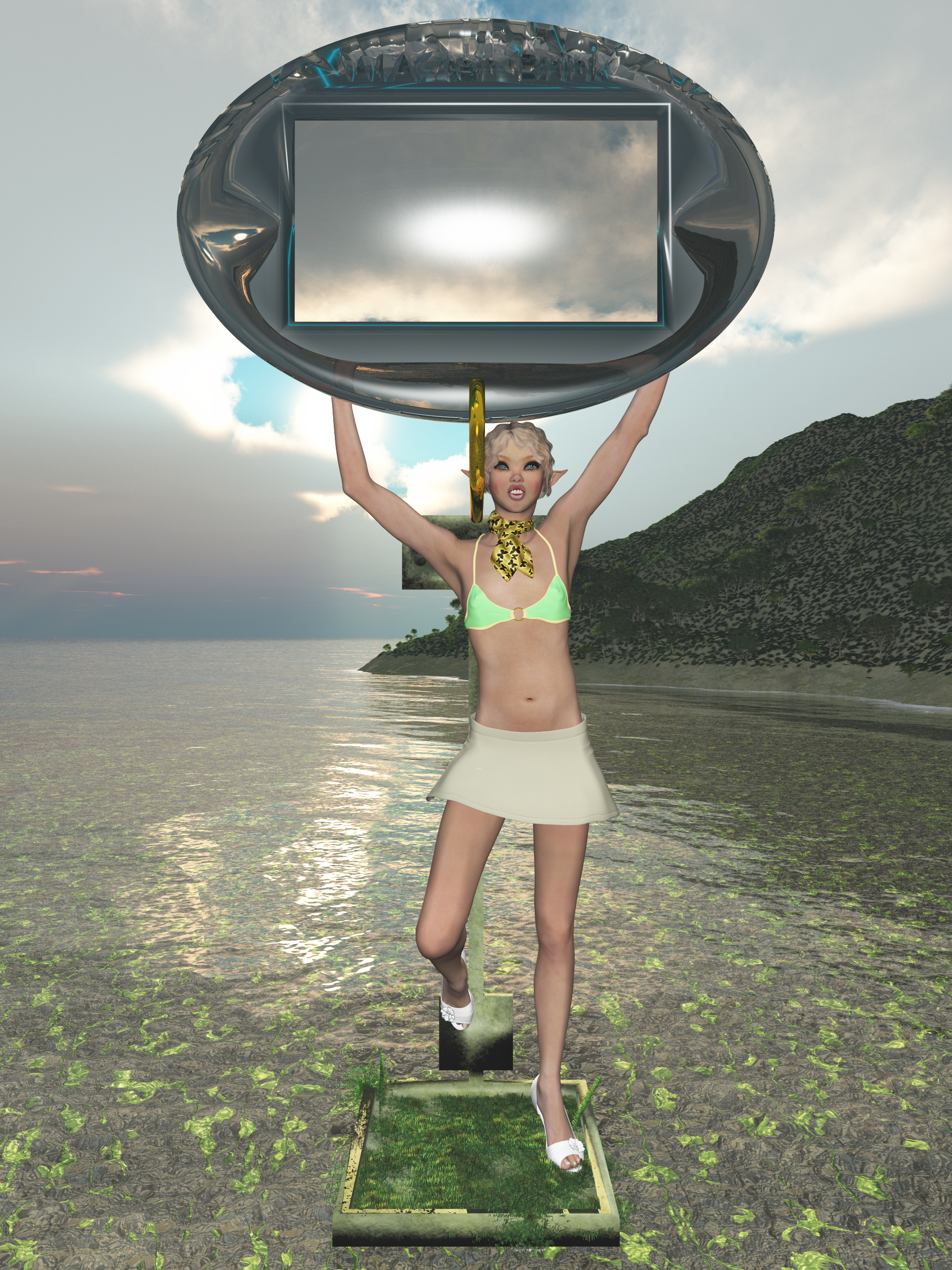
Azra Yilmaz Poses II
Enter a caption

What is encryption and what do we need to encrypt? That is an important question that I hope to answer now.

Encryption is a way to protect sensitive data by making it harder to read the data. It basically has to prevent that people can look at it and immediately recognize it. Encryption is thus a very practical solution to hide data from plain view but it doesn’t stop machines from using a few extra steps to read your data again.

Encryption can be very simple. There’s the Caesar Cipher which basically shifts letters in the alphabet. In a time when most people were illiterate, this was actually a good solution. But nowadays, many people can decipher these texts without a lot of trouble. And some can do it just inside their heads without making notes. Still, some people still like to use ROT13 as a very simple encryption solution even though it’s almost similar to having no encryption at all. But combined with other encryption methods or even hashing methods, it could be making encrypted messages harder to read, because the input for the more complex encryption method has already a simple layer of encryption.

Encryption generally comes with a key. And while ROT13 and Caesar’s Cipher don’t seem to have one, you can still build one by creating a table that tells how each character gets translated. Than again, even the mathematical formula can be considered a key.

Having a single key will allow secret communications between two or more persons and thus keep data secure. Every person will receive a key and will be able to use it to decrypt any incoming messages. These are called symmetric-key algorithms and basically allows communication between multiple parties, where each member will be able to read all messages.

The biggest problem of using a single key is that the key might fall into the wrong hands, thus allowing more people access to the data than originally intended. That makes the use of a single key more dangerous in the long run but it is still practical for smaller sessions between multiple groups, as long as each member has a secure access to the proper key. And the key needs to be replaced often.

A single key could be used by chat applications where several people will join the chat. They would all retrieve a key from a central environment and thus be able to read all messages. But you should not store the information for a long time.

A single key can also be used to store sensitive data into a database, since you would only need a single key to read the data.

A more popular solution is an asymmetric-key algorithm or public-key algorithm. Here, you will have two keys, where you keep the private (master) key and give others the public key. The advantage of this system is that you can both encrypt and decrypt data with one of the two keys, but you can’t use the same key to reverse that action again. Thus it is very useful to send data into a single direction. Thus the private key encrypts data and you would need the public key to decrypt it. Or the public key encrypts data and you would need the private key to decrypt it.

Using two keys thus limits communication to a central hub and a group of people. Everything needs to be sent to the central hub and from there it can be broadcasted to the others. For a chat application it would be less useful since it means the central hub has to do more tasks. It needs to continuously decrypt and encrypt data, even if the hub doesn’t need to know the content of this data.

For things like email and secure web pages, two keys is practical, though. The mail or web server would give the public key to anyone who wants to connect to it so they can encrypt sensitive data before sending it to the server. And only the server can read it by using the private key. The server can then use the private key to encrypt new data and send it to the visitor, who will use the public key to decrypt the message again. Thus, you have secure communications between two parties.

Both methods have some very secure algorithms but also some drawbacks. Using a single key is risky if that key falls into the wrong hands. One way to solve this is by sending the single key using a two-key algorithm to the other side! That way, it is transferred in a secure way, as long as the key used by the receiver is secret enough. In general, that key should need to be a private key so only the recipient can read the single-key you’ve sent.

A single key is also useful when encrypting files and data inside databases since it would only require one key for both actions. Again, you would need to store the key in a secure way, which would again use a two-key algorithm. You would use a private key to encrypt the single key and include a public key in your application to decrypt this data again. You would also use that public key inside your applications only but it would allow you to use a single public key in multiple applications for access to the same data.

As I said, you need to limit access to data as much as possible. This generally means that you will be using various different keys for various purposes. Right now, many different encryption algorithms are already in use but most developers don’t even know if the algorithm they use is symmetrical or asymmetrical. Or maybe even a combination of both.

Algorithms like AES, Blowfish and RC4 are actually using a single key while systems like SSH, PGP and TLS are two-key algorithms. Single-key algorithms are often used for long-term storage of data, but the key would have additional security to avoid easy access to it. Two-key algorithms are often used for message systems, broadcasts and other forms of communication because it is meant to go into a single direction. You don’t want an application to store both a private key and matching public key because it makes encryption a bit more complex and would provide a hacker a way to get the complete pair.

And as I said, a single key allows easier communications between multiple participants without the need for a central hub to translate all messages. All the hub needs to do is create a symmetrical key and provide it to all participants so they can communicate with each other without even bothering the central hub. And once the key is deleted, no one would even be able to read this data anymore, thus destroying almost all traces of the data.

So, what solution would be best for your project? Well, for communications you have to decide if you use a central hub or not. The central hub could archive it all if it stays involved in all communications, but you might not always want this. If you can provide a single key to all participants then the hub won’t be needed afterwards.

For communications in one single direction, a two-key algorithm would be better, though. Both sides would send their public key to the other side and use this public key to send messages, which can only be decrypted by the private key which only one party has. It does mean that you actually have four keys, though. Two private keys and two public keys. But it happens to be very secure.

For data storage, using a single key is generally more practical, since applications will need this key to read the data. But this single key should be considered to be sensitive thus you need to encrypt it with a private key and use a public key as part of your application to decrypt the original key again.

In general, you should use encryption whenever you need to store sensitive data in a way that you can also retrieve it again. This is true for most data, but not always.

In the next part, I will explain hashing and why we use it.

The need of security, part 1 of 3.

Azra Yilmaz Poses I
Enter a caption

Of all the things developers have to handle, security tends to be a very important one. However, no one really likes security and we rather live in a society where you can leave your home while keeping your front door open. We generally don’t want to deal with security because it’s a nuisance!

The reality? We lock our doors, afraid that someone gets inside and steal things. Or worse, waits for us to return to kill us. We need it to protect ourselves since we’re living in a world where a few people have very bad intentions.  And we hate it because security costs money, since someone has to pay for the lock. And it takes time to use it, because locking and unlocking a door is still an extra action you need to take.

And when you’re developing software, you generally have the same problem! Security costs money and slows things down a bit. And it is also hard to explain to a client why they have to pay for security and why the security has to cost so much. Clients want the cheapest locks, yet expect their stuff is as safe as Fort Knox or even better.

The worse part of all security measures is that it’s never able to keep everyone out. A lock on your door won’t help if you still leave the window open. And if the window is locked, it is still glass that can be broken. The door can be kicked in too. There are always a lot of ways for the Bad People to get inside so what use is security anyways?

Well, the answer is simple: to slow down any would-be attacker so he can be detected and dealt with, and to make the break-in more expensive than the value of the loot stored inside. The latter means that the more valuable the loot is, the stronger your security needs to be. Fort Knox contains very valuable materials so it has a very strong security system with camera’s and lots of armed guards and extremely thick walls.

So, how does this all translate to software? Well, simple. The data is basically the loot that people are trying to get at. Legally, data isn’t property or doesn’t even has much legal protection so it can’t be stolen. However, data can be copyrighted or it can contain personal information about people. Or, in some cases, the data happens to be secrets that should not be exposed to the outside world. Examples of these three would be digital artwork, your name and bank account number or the formula for a deadly poison that can be made from basic household items.

Of all this data, copyrighted material is the most common item to protect, and this protection is made harder because this material is meant to be distributed. The movie and music industry is having a very hard time protecting all copyrighted material that they have and the same applies to photographers and other graphical artists. But also software developers. The main problem is that you want to distribute a product in return for payment and people are getting it without paying you. You could consider this lost profit, although if people had no option but pay for your product, they might not have wanted it in the first place. So the profit loss is hard to prove.

To protect this kind of material you will generally need some application that can handle the data that you’re publishing. For software, this would be easy because you would include additional code to your project that will check if the software has been legally installed or not. Often, this includes a serial number and additional license information and nowadays it tends to include calling a special web server to check if licenses are still valid.

For music and films, you can use a technique called DRM which works together with proper media players to make additional checks to see if the media copy happens to be from a legal source or not. But it would limit the use of your media to media players that support your DRM methods. And to get media players to support your DRM methods, you need to publish those methods and hope they’re secure enough. But DRM has already been bypassed by hackers many times so it has proven to be not as effective as people hoped.

And then there’s a simpler option. Add a copyright notice to the media. This is the main solution for artwork anyways, since there’s no DRM for just graphic images. You might make the image part of an executable but then you have to build your own picture viewer and users won’t be able to use your image. Not many people want to just see images, unless it is pornography. So you will have to support the basic image file formats, which are generally .JPG or .PNG for any image on the Internet. Or .GIF for animations. And you protect them by adding a warning in the form of a copyright notice. Thus, if someone is misusing your artwork and you discover the use of your art without a proper license, then you can start legal actions against the violator and claim damages. This would start by sending a bill and if they don’t pay, go to court and have a judge force them to pay.

But media like films, music and images tend to be hard to protect and often require going to court to protect your intellectual property. And you won’t always win such cases either.

Next on the list is sensitive, personal information. Things like usernames and passwords, for example. One important rule to remember is that usernames should always be encrypted and passwords should always be hashed. These are two different techniques to protect data and will be explained in the next parts.

But there is more sensitive data that might need to be stored and which would be valuable. An email address could be misused to spam people so that needs to be encrypted. Name, address and phone numbers can be used to look up people and annoy those people by ordering stuff all over the Internet and have it sent to their address. Or to make fake address changes to change their address to somewhere else, so they won’t receive any mail or other services. Or even to visit the address, wait until the people left the house and then break in. And what has happened in the past with addresses of young children is that a child molester learns of their address and goes to visit them to rape and/or kidnap them. So, this information is also sensitive and needs to be encrypted.

Other important information would be bank account information, medical data and employment history would be sensitive enough to have encrypted. Order information from visitors might also be sensitive if the items were expensive since those items would become interesting things to steal. You should basically evaluate every piece of information to determine if it needs to be encrypted or not. In case of doubts, encrypt it just to make it more secure.

Do keep in mind that you can often generate all kinds of reports about this personal data. A simple address list of all your customers, for example. Or the complete medical file of a patient. These documents are sensitive too and need to be protected, but they’re also just basic media like films and artwork so copies of those reports are hard to protect and often not protected by copyrights. So be very careful with report generators and have report contain warnings about how sensitive the data in it actually is. Also useful is to have a cover page included as the first page of a report, in case people will print it. The cover page would thus cover the content if the user keeps it closed. It’s not much protection but all small bits are useful and a cover page prevents easy reading by passer-by’s of the top page of the report.

Personal information is generally protected by privacy laws and thus misuse of personal information is often considered a criminal offense. This is unlike copyright violations, which are just civil offenses in general. But if you happen to be a source of leaking personal information, you and your company could be considered guilty of the same offense and will probably be forced to pay for damages and sometimes a large fine in case of clear negligence in protecting this data.

The last part of sensitive data tends to be ideas, trade secrets and more. In general, these are just media files like reports and thus hard to protect, although there are systems that could store specific data as personal data so you can limit access to it. Ideas and other similar data are often not copyrightable. You can’t get copyright on an idea. You can only get copyright over the document that explains your idea but anyone who hears about your idea can just use it. So if you find a solution for cleaner energy, anyone else could basically build your idea into something working and make profits from it without providing you any compensation. They don’t even have to say it was your idea!

Still, to protect ideas you can use a patent, which you will have to register in many countries just to protect your idea everywhere. Patents become open to the public so everyone will know about it and be able to use it, but they will need to compensate you for using your idea. And you can basically set any price you like. This system tends to be used by patent trolls in general, since they describe very generic ideas and then go after anyone who seems to use something very similar to their idea. They often claim an amount of damages that would be lower than the legal amount it would cost the accused to fight back, so they tend to get paid for this trolling. This is why many are calling for patent reforms to stop these patent trolls from abusing the system.

So, ideas are very sensitive. You generally don’t want to share them with the generic public since it would allow others to implement your ideas. Patents are a bit expensive and not always easy to protect. And you can’t patent everything anyways. Some patents will be refused because they’ve already been patented before. And yet you still need to share them with others so you can build the idea into a project. And for this, you would use a non-disclosure agreement or NDA.

An NDA is basically a contract to make sure you can share your idea with others and they won’t be allowed to share it with more people without your permission. And if your idea does get leaked, those others would have to compensate your financial losses due to leakage as mentioned in the NDA contract. It’s not very secure but it generally does prevent people from leaking your ideas.

Well, except for possible whistleblowers who might leak information about any illegal or immoral parts of your idea. For example, if your idea happens to be to blow up the subway in Amsterdam and have an NDA with a few other terrorists to help you then it becomes difficult when one of those others just walks to the police to report you and those who help you. The NDA just happens to be a contract and can be invalidated for many reasons, including the more obvious criminal actions that would relate to it.

But there are also so-called blacklists of things you can’t force in an NDA, depending on the country where you live. It is just a contract and thus handled by the Civil courts. And if the NDA violates the rights of those who sign it then it could be invalid. One such thing would be the right of free speech, where you would ban people from even discussing if your idea happens to be good or not.

Other sensitive information would be things like instructions on how to make explosives or business information about the future plans of Intel, which could influence the stock market. Some of this information could get you into deep trouble, including the Civil Court or Criminal Court as part of your troubles, resulting in fines and possibly imprisonment if they are leaked.

In general, sensitive information isn’t meant to be shared with lots of people so you should seriously limit access to such information. It should not be printed and you should not email this information either. The most secure location for this information would be on a computer with no internet connection but having a strong firewall that blocks most access methods would be good enough for many purposes.

So we have media, which is hard to protect because it is meant to be published. We have sensitive data which should not fall in the wrong hands for various reasons and we have personal data, which is basically a special case of sensitive data that relates to people and thus has additional laws as protection.

And the way to secure it is by posting warnings and limiting access to the data, which is difficult if it was meant to be published. But for those data that we want to keep private, we have two ways of protecting it next to limiting the physical access to this data.

To keep things private, you will need to have user accounts with passwords or other security keys to lock the data and limit access to it. And these user accounts are already sensitive data so you should start with protecting it here, already.

Of all the things software developers do, security happens to be the most complex and expensive part, since it doesn’t provide any returns on investments made. All it does is try to provide assurance that data will only be available for those who are meant to use it.

The two ways to protect data is through encryption and through hashing, which are two similar things, yet also differ in their purpose. I will discuss both in my next posts.

Print your own cases, part 10 of 10

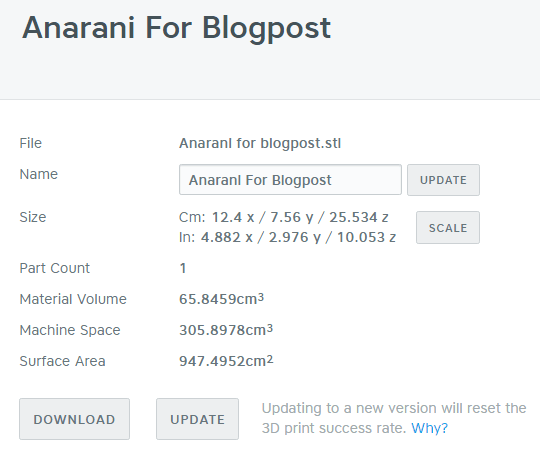
In the previous post and the post before I showed how I repair my models before they’re ready to print. The final step is actually uploading the model to Shapeways. This happens to be the most exciting part since it will tell you if there are any flaws in the final model.

I already had a lot of problems repairing the model and had to remove a small piece of it to make it manifold. But there are other problems that might occur when uploading a model to Shapeways. One of the more annoying things are loose parts that are too small to notice immediately. However, those very small parts might prevent the model from being printed because they’re smaller than the minimum bounding box. And you have to pay extra for multiple parts so you just don’t want those small, loose parts!

2016-04-20

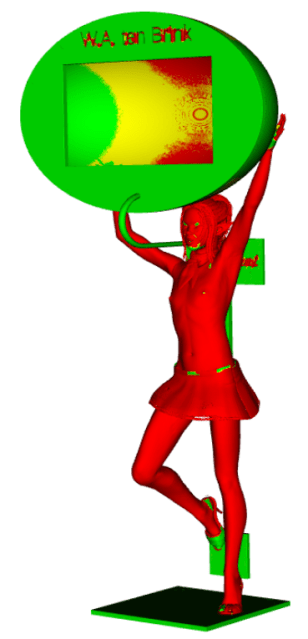
And as I said, it has some very small, loose parts! These are actually caused by the chosen hair style, which seems to have strands of hair flying around her head. 

It would have been nice if Shapeways had a feature to remove these loose parts but all it does is tell me how large they are. One main part of 12.4×7.6×25/5 cm and three parts that are smaller than a tenth of a cubic millimeter. Those are the ones that prevent this model from being printed successfully!

So at this point I should actually fix this by choosing a different hair style. But I will use the MeshMixer trick again of separating all shells and then just remove all parts that seem too small to use. All small parts would already be too small to really get noticed so removing them won’t have much effects. Well, except in Shapeways, where the removal of the small pieces will hopefully result in a printable model.

2016-04-20 (1)

Uploading to Shapeways is a slow process which can take minutes before it is done. And even after the file is uploaded, it could still take some time before it is completely ready to be printed. But it is needed so Shapeways will show me where the loose parts are that need to be removed. To do so, I need give Shapeways to render the image for me that will display them for me. And one part is on her left front and the other two on her left back side of her head.

But it is easier to remember that I should not use this hairstyle for 3D models in the future. But for now, I will just try to fix this model without going back to Poser.

So, how do I fix this? Simple. I will go back to OpenSCAD and adjust the floor panel. I then import it again in Poser and give it the exact size and position as the old version. I will then change Anarani’s hair to a better hairstyle and go through the whole process again. And while it sounds like a lot of works,once you’ve done these steps over and over again, it becomes about half an hour work, including the time needed to wait for the system to render or calculate things. I won’t create a new artistic rendering, though. But the new model will be uploaded to Shapeways.

And once the upload was successful, I started noticing that the strings of her bikini top weren’t very visible in Shapeways. So, as the last fix for this model, I removed her top. The result was finally printable!

2016-04-20 (2).png

But the wall thickness is still a reason for the model to be rejected. Fortunately you can specify that you wanted it printed anyways when you order it, thus it will be printed. Problem is that it has some risky areas that might not print well. In this case, the skirt, the scarf and the hair will cause trouble.

A price has also been calculated. Including taxes, this model will cost me $101.86 if I want it. Right now, my budget prevents me from buying it, though.When 3D printing is a hobby, make sure you have a budget set aside for the amount that you can spend on these prints, else you’ll end up broke before you know it!

The price is reasonable for such a large figurine. Do keep in mind that it’s over 25 cm tall! I did save on the price by having the other two dimensions as short as possible, thus conserving machine space. I also made it hollow, which also reduces the costs. But the container for my device is still very large.

2016-04-20 (3)

Machine space is one important factor when printing in white plastic. The system is calculating a small, extra area around the model that would be off-limits for other printed items. When the model gets printed together with other objects, this space is important to make sure no two models get fused together! But the price of the model is based on the volume of the model and the machine space needed.

Now, the objects with the smallest machine space would be a sphere. Thus, the round shape of the box is saving me some space, even though it is big. It is actually the back panel that adds extra machine space, since the area between the panel and the model is added into the math.

Fortunately, they do calculate it very precise and at one point, the space between back panel and model is wide enough to allow a hole, else it would have been a bit more expensive. But Shapeways will tell you how much space it actually needs.

2016-04-20 (5)

Because I made a hollow mode, the material volume is quite low! White plastic costs $0.28 per cm³, thus this is only $18.44.

But the space costs $0.21 per cm³ and that adds up to $64.24. Add $1.50 for the start price for a single part print and I have a total of $84.18 excluding taxes. Taxes are 21% so the total price according to my calculations is $101.86.

So, what makes the 3D print so expensive? Mostly machine space, although that can be reduced by avoiding space-wasting areas in your model. Here, removal of the back panel should have saved me a bit of space. The space between her arms and legs are also added so because she’s standing on a plateau and holding an object, two ‘rings’ of print material are created and the space inside that ring is added to the material volume.

Put the legs wider apart could have saved some machine space, if it would be wide enough to allow a hole through the leg-ring. The same applies to her arms.

This model would actually cost $63.38 if I would print it in sandstone since you only pay for the material volume in sandstone. Sandstone does cost $0.75 per cm³ but because the model is hollow, that would basically be that 65 cm³. So it would be great to have it printed in sandstone, except for one major problem… Sandstone requires thicker materials. Supporting walls must be at least 2 mm and unsupported walls have to be even thicker!

2016-04-20 (6)

The heatmap of wall thickness shows how much of the model is at risk of failing when printed in sandstone. In this case, almost the whole Anarani part. The box itself also has areas that are too thin. Only the back panel seems to be strong enough!

Would other materials be an option? Considering the large size of the model, most materials would not qualify because the model is too big for the printers to handle. Metallic plastic would be an option but then you still pay for material volume and this plastic is more expensive than white plastic. $164.87 is quite a lot.

Frosted Ultra Detail is another option but even more expensive at $284.11 so I won’t even consider that as an option.

Stainless steel is an option but like sandstone, it has too many thin areas so it won’t print in the end. And for the other materials, the model is just too big…

I have created Poser models in colored sandstone, though. But these models are solid and I had to be real careful to avoid any thin parts. Especially hair and fingers turn out to be vulnerable. And the model needs to be strong enough to carry it’s own weight and is extremely vulnerable when it is just printed since the sandstone is still soft. Like the wet sand that’s used to make sandcastles.

Print your own cases, part 9 of 10

In the previous post I used NetFabb to repair my model. I will also show an alternative option here.

Since the repair in NetFabb went wrong in the previous step, I will do a repair using MeshLab instead. So I open MeshLab and import the hollow model. I also use the menu options ‘Render/Show non manif edges’ and ‘Render/Show non manif vertices’ to show the non manifold parts of my model.

If the geometry is non-manifold then that means that it cannot exist in the real world. In general, it means there are pieces that are disconnected or don’t fit perfectly. Those need to be fixed. And as the image shows, my model seems to have a lot of those, especially in the floor plane.

2016-04-19 (19)

I first start to fix the non-manifold edges. I use ‘Filters/Cleaning and Repairing/Select non-manifold edges’ to select them all and then I delete the current selection of faces and vertices. And when I do that, this happens:

2016-04-19 (20)

It removed a large piece of the floor plane!

So, I start over again with MeshLab and use ‘Filters/Cleaning and Repairing/Select non-manifold vertices’ and ‘Delete selected vertices’ instead. This needs to be repeated several times but it does the trick. The floor plane stay solid while the model is repaired. But it still isn’t enough. So I have to try to repair it with NetFabb again and this time I do an automatic repair but before accepting the repair, I select the triangles that cover the floor plane and remove them. That way, the floor plane gets its border back. Since it will have repaired most other issues, this will be the version I use for further attempts to repair it.

So, one solution would be to redo the whole model from the beginning. I would need to fix the floor plane, import it in Poser again, set it to the proper size, export all from Poser, remove the textures and merge all parts, rescale, cut and then try to repair it again. But as it turns out, there is another solution to remove that floor plane.

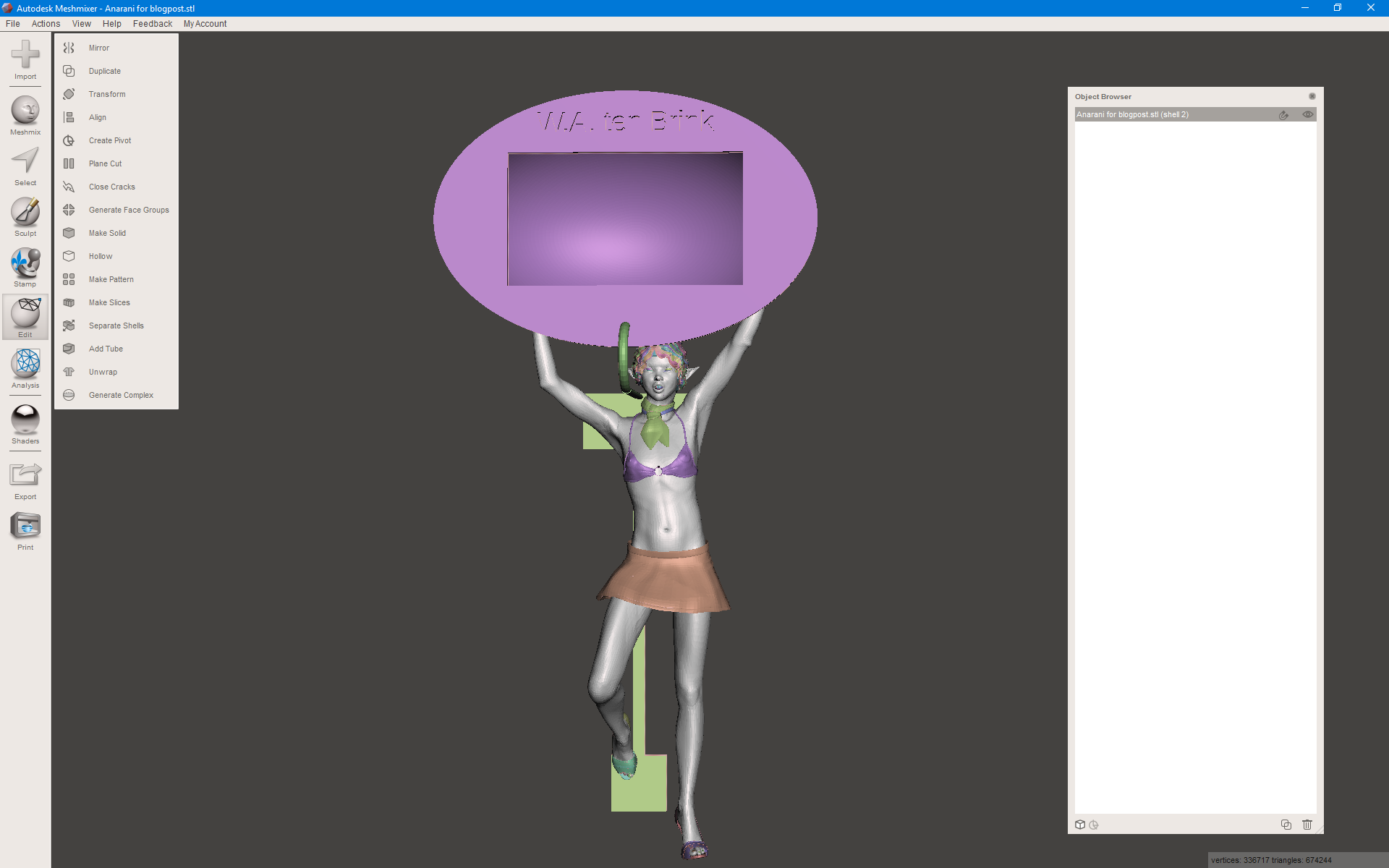
MeshMixer has an option ‘Edit/Separate shells’ which can be used to split the whole thing up in loose parts. I can then join all the parts again minus the floor plan. The floor plane is just cut away while keeping her foot intact. This is then exported again and repaired. And since the whole model was already manifold except for the floor plan, there isn’t much to be repaired to begin with.

This is what the model looks like now:

2016-04-19 (21)

The floor plane would have given her a better look and a way to stand on her own, but this is why I added the back plane with magnets anyway. The connections will be weaker, though.

The last part is printing the 3D object.

Print your own cases, part 8 of 10

In the previous post, I scaled my Poser model and removed the ruler. It is now time to do an automated fix.

2016-04-19 (17)

Once a model leaves MeshMixer, it is almost ready to be printed. However, when using the services of Shapeways it is always a good idea to check the model for any potential errors. This is where I use NetFabb Basic. 

In NetFabb I get my last view before I accept the model as something that would print well. As you can see, this is the hollowed model with two holes on her butt. They are large enough so any excess plastic can be removed from the model. But once you receive the 3D print, there can still be some excess material inside so you will still have to check if it is clean inside.

Hollow models have a challenge, since they increase the amount of polygons considerably. Where you just had only an outside, you now also have an inside. Sure, it is less material but Shapeways has a limitation in the number of polygons that are allowed. Fortunately, this model doesn’t go above that maximum.

It can also happen that the file size is larger than 64 MB. Shapeways can’t upload files bigger than that. That can also be solved easily by adding the file to a compressed .zip file and upload the .zip file. (Unless the .zip file is also larger than 64 MB, in which case your model is too complex to print.)

Repair is quite simple. I click on the red cross in the toolbar to initialize the repair options. I select ‘Automatic repair’ and then ‘Default repair’ and then just wait until it is done. Once done, click ‘Apply repair’ and have the old part removed. Then you should have a fine result.

However, in my case, something went wrong and the floor panel with its border became a solid block. This happened:

2016-04-19 (18)

And this is why you should repair it first in NetFabb, because Shapeways would do the repair in almost exactly the same way! In most cases things will go well but here I prefer to use MeshLab instead to repair the model manually.

I did try some manual repairs in NetFabb but they keep filling this floor plane so NetFabb doesn’t work as well as I hoped for this model.

Is there a way to fix this problem in NetFabb? I don’t know and might have to buy the professional version to find out. However, NetFabb happens to be too expensive for the rare times that I need it.

Still, one way to fix it is by redoing the OpenSCAD model and then start all over again from Poser until this post. I would need to remove the old back panel from the Poser model and put the new one in place at the proper size. I would then have to do all steps over again which is a bit annoying. So I will try again with MeshLab and if that fails, I’ll try some other solution.

In the next post I will show an alternative solution to repair models using MeshLab.

Print your own cases, part 7 of 10

In the previous post I cleaned the Poser model and made it a single object. Now comes the part where I start to scale and cut, and occasionally hollow my object.

2016-04-19 (13)

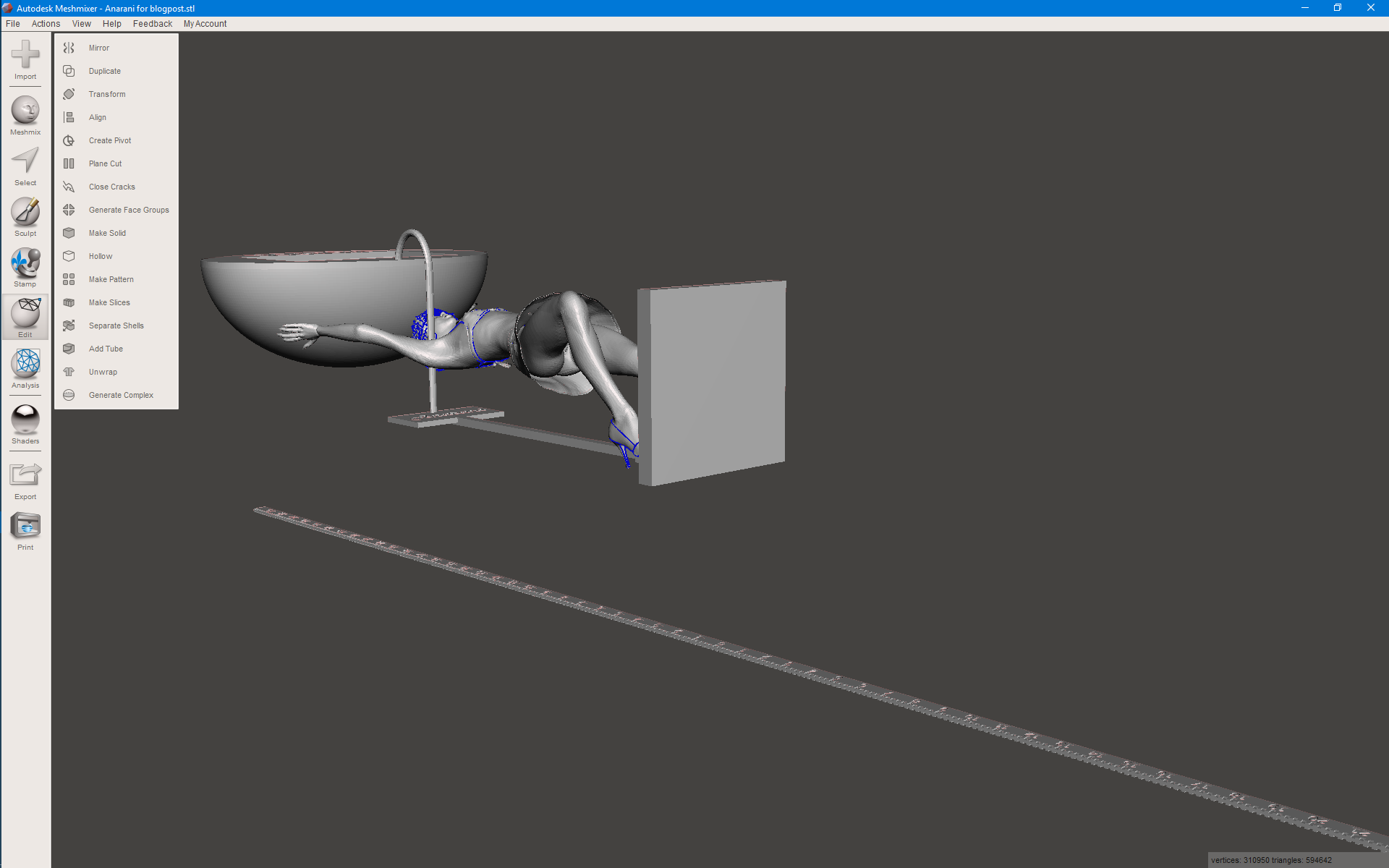
To start, open the .stl file from the earlier post in MeshMixer. And it will probably look like this:

Now, that is a minor annoyance. I will need to rotate and resize it first. I choose ‘Edit/Transform’ and do a ‘Rotate X’ for 90 degrees and put ‘Size Z’ to 600 mm which is the exact length of the ruler. Once it has the proper scale, I export the file to the folder 4 and import it again, replacing the current object in MeshMixer. I need to do this because MeshMixer gets a bit confused after resizing and the model looks ugly in the view. There’s nothing wrong with the model, though. It’s just MeshMixer having a bad render engine.

2016-04-19 (15)

Next, we will cut the ruler away. Using ‘Edit/Plane cut’ I rotate the cutting plane vertically and move it to somewhere between the model and the ruler. It will look something like this:

And once I click ‘Accept’, the ruler is gone! It is that simple. And now I will also be able to tell the exact sizes of my model. It is 124x255x76 mm in size. Slightly larger than expected.

So I’m going to add a simple trick to cut the amount of material in my model! I’m going to make her hollow! Using ‘Edit/Hollow’ I will get several options to make a hollow model. This will save materials and thus make the print less expensive. But it will require a few holes in the model.

2016-04-19 (16)

I set ‘Offset Distance’ to 1 mm since that’s thick enough. ‘Solid accuracy’ and ‘Mesh Density’ are set to 512 to get the best details and ‘Hole Radius’ will be 3 mm to allow good holes for excess materials to be removed from the hollow inside. And this also shows why you should remove the teeth, inner mouth, tongue and gums if the model has her mouth closed! Those parts would fill the inside of her head if they were still there. By removing them, there’s a slightly bigger hollow space.

I put two hollow openings on her butt, since her skirt is already covering that area. If she was wearing panties or a bikini bottom, those holes might not work out as well because the clothing adds an extra layer which the hole won’t go through. MeshMixer makes good hollow objects but they aren’t always perfect.

I don’t have to make the box or back panel hollow since they are already thin enough.

So now the model is almost ready to be printed. However, there can be some hidden flaws that need to be repaired. In the next post I will apply some automated repairs before the model is ready to be printed.

Print your own cases, part 6 of 10

In the previous post I created an artistic rendering of my model. I will now use 3D converter to remove the textures and unwanted parts and to turn it into one solid part for further processing.

Now, we will export the Poser model to a Wavefront .obj file. I generally use a numbered file structure where the first folder (1) will contain all the Poser models that I want to print. The next folder is the export folder where the exported Poser models go to. I have even more folders with the 8th folder being used for all models that are ready to upload to Shapeways. And the 9th folder has everything that I have uploaded as backup. So when I upload a model, that uploaded file will also be stored in this folder.

Only folders 1 and 9 are permanent. Once a model is successfully uploaded, I remove the related files from the in-between folders. They’re not needed anymore.

So I start to export my model to folder 2: export. The .obj file will have references to any textures used but I’m generally not interested in textures. Still, if you want a print in colored sandstone then you should do a second export to the Collada .dae file format. Then you will have a sub folder with all textures used in your model. Put those textures together with the .obj file and the .mtl file into a compressed .zip file and upload that compressed file to Shapeways for printing in colored sandstone. However, tools like NetFabb, MeshMixer en Meshlab tend to remove textures if you’re not careful. This makes scaling a bit difficult.

So, why not export to just Collada? Well, the problem is that Poser has a bad implementation of the Collada file format. While it is supposed to export things correctly, it has flaws preventing you to import the model in some other tool. Much of the parts of your model will be missing if you try. Which is why I only use it to get all textures together and not for further processing of the model.

2016-04-19 (9)

But this time I only want a white, plastic print so textures can be removed.

That’s what the model looks like in 3D converter. The OpenSCAD objects had no texture so they have random colors. But the cane, shoes and bikini have textures that 3D converter can’t find.

The first step is ‘Layers/Make All Opaque’ which I use to change all transparent areas. You can’t 3D print transparent areas anyways so make them opaque. And once you do that, you will notice the eyes losing their textures too. Why? Because Poser has two transparent objects in front of the iris and eye, which are meant to be used to add reflections. These are the Cornea and eye surface and once removed, you will see a normal eye again.

Next, use ‘Tools_2/Set White As Color For Textures’. to make all parts nice and white beneath the textures. Then, use ‘Tools_2/Erase Textures on All layers’ to remove all the textures and you should have a nice, white model. Or, if you forgot to give all parts a white color, you get this:

Anarani for blogpost
2016-04-19 (12)

This is not a big problem anyways and we will fix this once all parts are merged.

At this point, I start to select the parts that I want to merge. All other parts will be removed. So, deselect all parts and then select only those parts that you clearly need, like the face, body and the OpenSCAD objects. Keep in mind that the cornea and eye surface need to be removed to have a more detailed eye. And if the model has her mouth shut, you can also remove the gums, inner mouth, tongue and teeth.

Eyelashes can be selected and look good on large models, but will hide the eyes on smaller models. I decided to hide them in this model. But make sure you select the ruler since you will still need it!

Her shoes have small flowers and petals, which could become loose shells in Shapeway so those are also removed. Then choose “Merge Select” from the bottom buttons to merge all parts that you have selected. This makes one part from all of those parts. And at this point you can save the file as a StereoLithography .stl file in binary to continue processing in the next step. This export file will be in my 3rd folder.

In the next post I will scale the model to its proper size and remove the ruler.

Print your own cases, part 5 of 10

In the previous post I created a Poser model and a few OpenSCAD models and joined them into one. But before I continue to manipulate them to make them ready for 3D printing, I wanted to do an artistic rendering of the model, just to show off! This means that I want a complete background with water, trees and other stuff and the model in the middle of it all, well-lit and looking cool.

While it might seem a waste of time, it does give one extra view on your model before you continue processing. It will look okay but the OpenSCAD objects will not have any color. Problem is that painting those object cannot be done in Poser or OpenSCAD so if you want a specific coloring of those objects, you will need a special tool to do so.

2016-04-19 (4)

Modeling in Vue is quite easy. You just import the Poser model and then you put it where you want it to be. But once imported, you should turn down the highlights of the Poser model, else it starts to shine, which isn’t pretty. So, select the complete Poser model in Vue and click “Edit all materials” to change the highlights. 

Vue now has a value of 50% for my model. This is actually the highlight of one part of your model and not all parts! But if you change this value, it will change it for all.

2016-04-19 (6)

Since it has the value of 50%, I can simply overwrite it with 0. If it had been 0, I would have chosen the value of 1 instead.

I have already removed the ruler from the list of parts in Vue and I can easily find the other pieces that I’ve created because of their names. Unfortunately, Poser tends to name all figures “body” while all properties keep their old name. And that’s a bit annoying.

Often I will rename those parts but this will just be a quick render so, skip it.

Since I lack the tools to paint the OpenSCAD models, I will just pick a few from the materials that Vue already has. I decide to pick grass for the back panel because it always looks good to have a model walking on grass. And I pick dark smoked glass for the box. The cane will be gold, making it shine.

Next, I check the materials that are provided by Poser. The dress, for example, has a zipper which uses a reflection map. I hate those, because Vue does a full 360-degree view of everything if I want to. Reflection maps are a poor alternative for real reflections.

2016-04-19 (7)

I also decided to change the color of her bra. This won’t replace the texture but just the color. And I decide to pick an orange trim and green cloth, both pastel-tints.

2016-04-19 (8)

I also decide to put the sun in the background to create a kind of ‘eye in the sky’ so I also need a second light, which I put at the location of the camera. To get it there, I just select the camera, which will put it in the center of the views. When you add lights or objects, they will be put at the same place. Thus, the light is at the location of the camera!

And a quick preview of the image shows me that it will look good. So let the rendering start!

Now, one reason I use Vue to create an artistic image is because it allows me to use a transparent material for some of the more complex objects. In this case, that would be the box with its round shape. With the image rendered at a large resolution I can check the box for possible flaws, if I want to use it again with another model.

In my next post I will show how I clean the model using Accutrans 3D. In the mean time, this is what the rendered artwork looks like:

Anarani for blogpost

Print your own cases, part 4 of 10

In my previous post I created a round container for my electronic thermometer and now I need to add it to my Poser model. But I also need a special stand for Anarani to stand upon, with a back panel for a couple of magnets. Lets immediately start with the OpenSCAD script:

$fn=250;
difference(){
  union(){
    cube([60, 60, 6]); 
    translate([28, 0, 0]) cube([4, 3, 160]);
    translate([20, 1, 10]) cube([20, 2, 20]);
    translate([10, 1, 140]) cube([40, 2, 20]);
    translate([30, 1, 20]) rotate([90, 0, 0]) cylinder(d=12, h=1);
    translate([20, 1, 151]) rotate([90, 0, 0]) cylinder(d=12, h=1);
    translate([40, 1, 151]) rotate([90, 0, 0]) cylinder(d=12, h=1);
  }
  union(){
    translate([3, 3, 2]) cube([54, 54, 5]);
    translate([30, 1, 20]) rotate([90, 0, 0]) cylinder(d=10, h=2);
    translate([20, 1, 151]) rotate([90, 0, 0]) cylinder(d=10, h=2);
    translate([40, 1, 151]) rotate([90, 0, 0]) cylinder(d=10, h=2);
    translate([30, 2, 150])
    rotate([270, 180, 0]) height = 2) {
      text("Anarani", 
      size = 7, 
      font = "Harlow Solid Italic", 
      halign = "center", 
      valign = "center"
      );
    }
  }
}

This isn’t very special. A floor plate with an edge and a pole with two plates which will hold the magnets. As you may notice, there is no connection to the box that I created in the earlier post. That connector will be something from Poser. All you have to do now is to convert these models to WaveFront .obj files and you can import them in Poser. So, let’s combine them with Anarani! And this will show a few issues with importing in Poser.

2016-04-19
Anarani for blogpost II_0001

When you do import models in Poser, prefer to enable “Percent of standard figure size”. The reason for this is that the standard figure size is extremely small, compared to the imported objects. I will scale them anyways once they are imported and because their size is relative to Anarani, I can use integer values between 1 and 100 to scale them. Otherwise, I would need to scale them to very small numbers with fractions.

Now, to do a proper scaling, I will use the ruler to measure the height of the opening in the temperature holder, which should be 46 mm. I will then use the ruler to scale the back panel to the proper size, thus having it synchronized with the size of the box.

You could wonder why I don’t combine all three parts into one .obj file and import that one, but when I do that, it becomes just a single part. And I need to move them around, so that isn’t very practical.

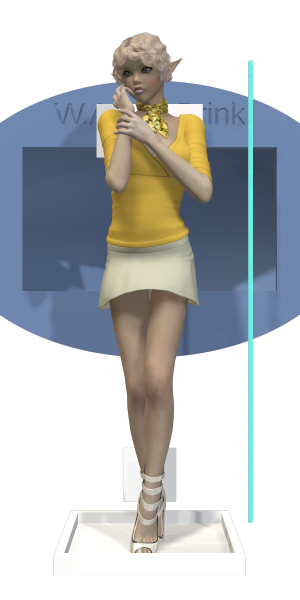
So I end up with my model looking like the image on the right. The temperature box is too big and the ruler is extremely small. The back panel seems to be okay, though. But first I will have to put Anarani in a nice pose. And reconsider the clothing she’s wearing, since not all clothes will print well on Shapeways. (Hint: if a piece of clothing is transparent when you look at it from a specific angle in Poser then it will not print very well!)

The next step is trying to make everything fit. Since the box is quite large, I decide that Anarani will hold it above her head, thus making the model even taller. I don’t want it to go in all three directions because that would require more machine space, thus making it more costly. The final height will be about 22 cm and it’s 75 mm wide and about 60 mm deep. (The sizes are from the bottom panel and the box.) The ruler is set up vertically so I can use that to scale it to the proper length, which would be 60 cm. I will then cut away the ruler from the model and thus have the exact height, although I don’t think the width and depth will change much from my prediction.

Anarani for blogpost III_0001

Anarani will look like this image. One foot on the floor panel and a second one against the back panel. Both feet touch these panels so they should be connected, although the support will be tricky.

The ruler has moved towards the back and will be used in one of the next steps to set the proper scale of the model, before I will remove it.

The box itself is held up by her arms. Here, the hands will need to touch the box to make sure that connection is strong too. But they can’t connect too well, else the fingers will disappear.

To get things at the proper size, I started with matching the ruler to the length of the back panel, which was 16 cm. I then used this to scale the box so the vertical height of the opening is 46 mm. If I did the math well, my device should fit just nicely.

Anarani for blogpost IV_0001

I have given Anarani high heels to wear and replaced her top with a bikini. This bikini top has a clothing thickness property allowing me to set the thickness of it, thus making sure it prints better.

The skirt she’s wearing is also special, since it is one of the few skirt models I have that has both an inside and an outside. Most clothing props for Poser tend to just cover one side and the render engine is smart enough to come up with the other side, if it needs to be rendered. But when you want to print those props, then the thickness is unknown and the repair function of Shapeways will actually fill it all up, thus turning the inside of a skirt into a massive block. With this skirt, I still have a skirt that you can look under.

I won’t tell if she’s wearing a bikini bottom!

As an extra support for the box I used a cane prop from Poser and put it to the proper scale and thickness. It should add stability to the whole thing. making sure the bottom plate doesn’t bend over due to the weight of it all. Since there will be magnets on the back side, that bottom plate would not be supported and thus bend. This cane also required me to make Anarani bend slightly. After I put the hands in placed and locked their place, I moved her hip to the side and started to bend back her abdomen and chest to go near the cane again. Next, her neck was bent away from the cane and her head back to the cane so her neck and head (and hair, ear) would not touch the cane.

To make sure it is well-balanced, the whole box is in the center of the floor panel so it doesn’t matter that Anarani is leaning on her left foot. Gravity works downwards so the model won’t tilt to the left or right. Also, the border on top of the floor plane was added to make it stronger without making it much thicker.

I used a cane because the box is higher than the back panel. The cane adds a few more cm to this height. Add to this the height of the box (50 mm) and you get close to my estimation of 22 cm in total.

In my next post I will render the model in Vue, with some interesting textures, just to show what it will look like.

Print your own cases, part 3 of 10

In the earlier post I created a ruler so I can make sure that my box will have the exact size that I have specified. As I said, Poser loses this information, forcing me to fix the scale of the export file once I’m done with the model in Poser.

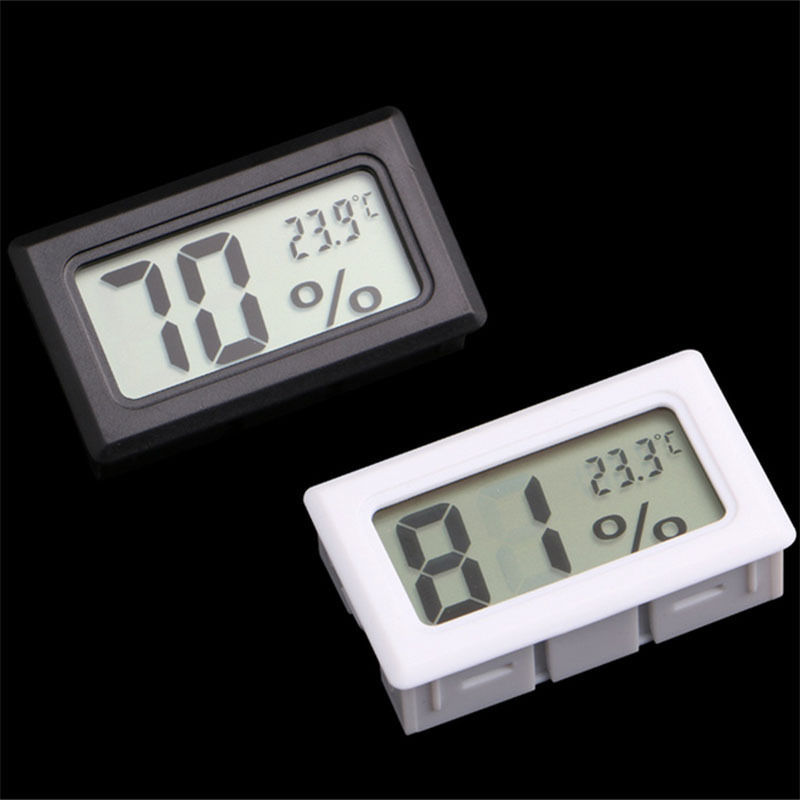
Temperature-Sensor
Mini Digital LCD Indoor Convenient Temperature Sensor Humidity Meter Thermometer Hygrometer Gauge

The device I will use is this thermometer that’s also shown on the left. (Image from AliExpress.) And the first thing I will have to do is measure it to get the exact dimensions. This is tricky because if you get the dimensions wrong, it either won’t fit or will be too loose to fit.

AliExpress does mention the size (3 cm x 4.8 cm x 1.6 cm) but these turn out to be incorrect! So, never assume the site will have exact measurements! Worse, this device has a small border that’s slightly bigger than the case itself, allowing a nice fit, but I need the size of the box, not the border. So, I take my ruler and start measuring the box. I end up with 45.75 mm x 25.9 mm x 13.5 mm. So, that’s the shape I need in OpenSCAD, which I will subtract from the real container.

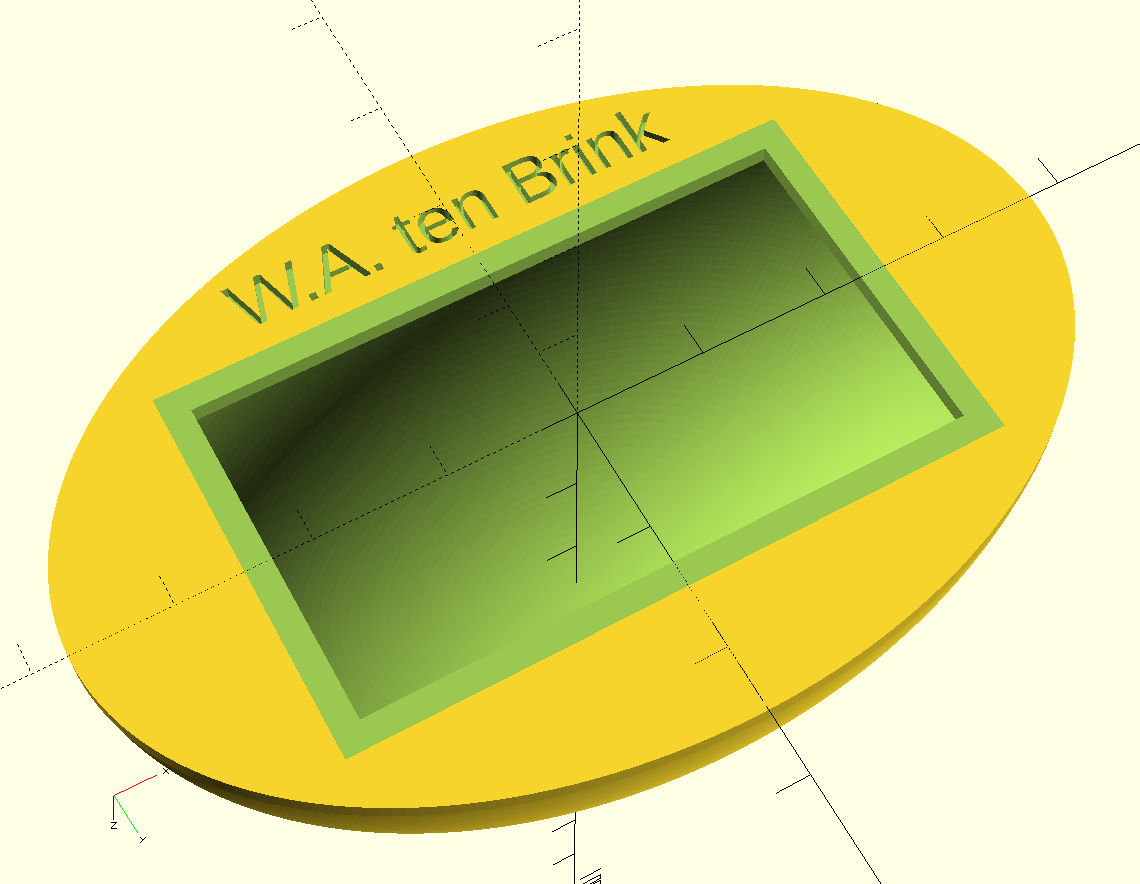
The container itself needs to be hollow and must have enough space to contain the device. And for this one, I want a container that is round. That adds more complexity but it will look better. And I want my name on it, so people know it’s mine!

Making this shape isn’t difficult but you need to play around a bit. I did create the clock as a block to subtract from my shape and I did this to make sure that it fits. Especially the back should not have any holes from the corners of the device, otherwise, it won’t fit.

However, to create these oval shapes in OpenSCAD you need to create a round cylinder and a round sphere and then resize the width, height and depth to the required dimensions before subtracting the box. This slows down the rendering slightly, especially if you use high details.

And in the top of my script I use ‘$fn=250;’ which sets the detail level to a reasonable level. Simply put, OpenSCAD can’t create round shapes but can make a close estimate by using triangles and squares in a curve. With a value of 6, my shape would actually be a six-sided model. With 250, the round shape is actually made of 250 small, flat panels. Since I’ve set it to be 75 mm wide, those panels will be barely noticeable. Do keep in mind that the 3D printer won’t be able to make round shapes either so the value of 250 will be small enough to match the print resolution of Shapeways. But if you polish it, the shape will become more round.

Now, the script:

$fn=250;
module Box(){
  translate([-23, -13, 0]) union(){
    difference(){
      union(){
        translate([0, 0, 0]) cube([46, 26, 14]);
        translate([-2, -2, -2]) cube([50, 30, 2]);
      }
      union(){
        translate([23, 13, -0.1]) rotate([180, 0, 0]) linear_extrude(height = 2) {
          text("12:30", 
          size = 10, 
          font = "Lucida Console Regular", 
          halign = "center", 
          valign = "center"
        );
        } // text
      } // union
    } // difference
    difference(){
      translate([-2, -2, -3]) cube([50, 30, 2]);
      translate([0, 0, -3]) cube([46, 26, 14]);
    } // difference
  } // union
}

difference(){
  resize(newsize=[75, 50, 27.5]) union(){
    cylinder(d=75, h=2);
    difference(){
      sphere(d=75);
      union(){
        sphere(d=72);
        translate([0, 0, 2-75/2]) cube(75, center=true);
      } // union
    } // difference
  } // union
  union(){
    Box();
    translate([0, -19, 1]) rotate([180, 0, 0]) linear_extrude(height = 1) {
      text("W.A. ten Brink", 
      size = 4, 
      font = "Lucida Console Regular", 
      halign = "center", 
      valign = "center"
    );
    } // text
  } // union
}

This time I did not create a separate method for the texts simply because I use only two texts of different sizes. Creating a module for that would require an additional parameter and the text function isn’t that complex.

I first create the box including a border and make it look a bit pretty. I make sure that the box-part that needs to be subtracted aligns to the center of the X-Y plane and lies against the zero Z plane. The border will stick out anyways but it allows me an easier way to put it in the proper place. Because of this, I don’t need to translate the position of the box.

Please, do notice that the text on the box is offset at 1/10th of a millimeter because else a thin piece of those numbers will become part of the rendering! Those would become loose parts so I need to add an offset. This is something you have to do when you do into the negative parts. I should actually do the same for the border but actually like the small line that it adds. It won’t be really noticeable when printed, though. But in the 3D software it will be visible as a thin line.

The dimensions of this box are 75x50x27.5 mm which is a bit large. Then again, the device itself isn’t that small either.

Like the ruler, I uploaded this model to Shapeways to get an estimate of the price and looks. It has slightly more volume as my ruler but the price is more than double of my ruler! The reason for this is because the price for plastic is determined by the volume of the model and the machine space that it takes. And although my ruler was long, it was also thin and not so high, thus it did not need as much space as this model.

In my next post I will combine this model with my model Anarani. In that post, I will also create the platform for Anarani to stand upon, although that won’t be very special.