Alienware Aurora.

In Dutch, for my Dutch readers. 🙂

Dell heeft tegenwoordig een mooi model desktop computer, te weten de Alienware Aurora. Een heel mooi systeem maar wel een beetje prijzig. Mooi uitrusten met 32 GB aan RAM, twee keer een 2 TB harde schijf en een NVidea Geforce GTX 690 grafische kaart met 4 GB geheugen maken dit systeem al behoorlijk krachtig. Een Intel Core I7-3970x processor erin van 4 GHz levert 6 cores op, wat met behulp van hyperthreading vertaalt naar 12 grafiekjes in de task manager.

Een heel mooi systeem, volgens mij. Maar ik moet nog even afwachten voor ik een eindoordeel kan geven. Mogelijk krijg ik dit systeem aanstaande dinsdag binnen!

Kost wel een arm en een been, maar verder best een stevig systeem en zal zeker mooi staan bij mijn laptop. (Maar weer wel veel lichtjes.)

Stratego

If you ever visited the Stratego site, and when you’re as old as I am, then this site will bring back nice memories from the past. (You did play the board game, didn’t you?) And now, you can play against other players online in a very good version of this not-that-old Dutch game! (Yeah, someone in the Netherland came up with the concept somewhere around the second World War.) (Who do we Dutch people call it the second one, while we’ve never been part of the first World War?)

Anyway, great game! You should play it sometimes. But let me offer some helpful tips to help you win the game…

First of all, the board has 10 rows with ten columns. There’s no real numbering for all the fields, though, but from the starting player’s perspective, I will number the rows from 1 to 10 and the columns from left to right A to J. So A1 is the bottom-left corner for the starting player and the top-right for the opponent.

The fields C5, C6, D5, D6, G5, G6, H5 and H6 cannot be used, thus the play area is literally divided into three strategic areas. A left flank, a right flank and the center. And the trick is to get control over these lanes, making sure your opponent can’t get past, while you yourself can move into the enemy’s territory. This is not that easy, though, since both players start at equal strength. So, you need to capture the most valuable pieces of your opponent without losing your own valuable pieces.

Most people consider the Marshall to be the most valuable piece. Actually, it’s not. It’s so powerful that you would like to use it for offensive purposes but the only piece stronger than the Marshall is the Spy, and the Spy is a pure defensive piece. Once one of your pieces has been taken by the Marshall, you can easily remember where it is and how it walks around the board, thus avoiding it with your General. Basically, your General is more practical to use for offensive purposes once you know where your enemy keeps his Marshall. Better keep your Marshall hidden in the beginning so your opponent cannot use the full force of his General.

After the General you have the two Colonels. But to keep them safe, you will also need to track the enemies General. Keeping track of two pieces is a bit difficult for some. But try to capture the Colonels of your opponent and they will offer you a lot of strength.

Next is the Major, and you have three of those. Keep them in reserve for when you’ve lost the more powerful pieces. You should still try to capture your opponents Majors, though. Because once the strongest pieces have been traded and taken from the board, these majors can help you close the lanes that your enemy uses to get into your territory.

The Captain and Lieutenant are less powerful and can be used to scout the territory of your enemy. They will often be taken by stronger pieces and hopefully a Colonel or General will take them. Which is great, since it’s a good thing to remember where your enemy keeps those pieces. Still, be careful not to lose your Lieutenant to a Captain since knowing where the Captains are is less valuable than knowing where your enemy keeps his General. You have four of both, which you should divide evenly on your flanks.

The Sergeant is most practical to keep behind bombs, since they are stronger than the Miners that are used to defuse bombs. If you manage to capture all five enemy Miners then your flag is safe if it’s behind bombs. Otherwise, your enemy has to take more risks into guessing which non-moving pieces are bombs or flags. Still, with four Sergeants and five Miners, you will have to capture some enemy Miners with your other pieces.

Your often advised to keep your eight scouts in the front. This isn’t always a good idea, since your opponent will also keep scouts in the front, thus all you’d be doing is exchange your scout with those of the enemy. Most scouts are on suicide missions anyways, so better use them to retrieve more valuable information. Since a scout can only win from a Spy, they’re great to keep in the back to check where your enemy keeps their Spy. Because if you take away the Spy from your enemy, your Marshall will be the strongest offensive piece on the board.

And where to keep your Spy? Most players will keep their Spy near their General. That way, if the enemy gets closer with his Marshall, your Spy can defend your General. But often it’s also practical to keep your Spy in one place, not moving it until some of the major pieces are off the board. Also, if you manage to capture a Colonel or General from your enemy, you can exchange your Marshall with the Marshall of your enemy, thus making you more powerful.

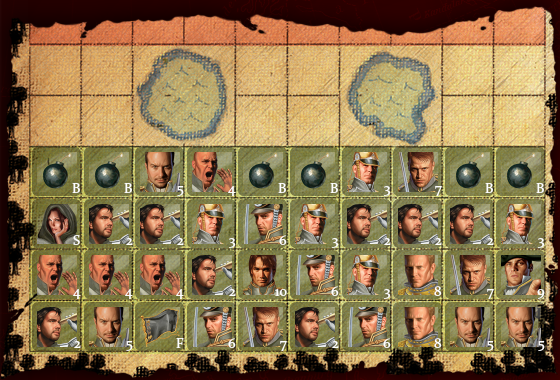
And then we have Bombs. Nothing can defeat a Bomb, except for a Miner. Put them around your Flag, make sure your enemy has no Miners and your opponent will now be unable to win, unless he manages to take all your pieces. Or until you cannot move anymore, because your pieces are locked behind Bombs. For example, the following setup will make you lose before you start:

AutoLose

I’ve occasionally seen players use bombs to block one of the three lanes on the board. Often the right or left flank. Is this a wise strategy? Most players who used this against me just lost, because I then focus on the two open lanes, knowing my opponent is unable to use this third lane. But if I need it, I can easily open it by sacrificing a Miner against it. (Which will be taken by a stronger piece behind it, but okay… I have the new lane through which I can move my strongest pieces, if need be.

I’ve often found bombs to be a nuisance for myself, simply because they block my movement. You can’t destroy your own bombs, nor can you move them to a better place. So I prefer them to be on the first two lines, with an occasional bomb on the third line, preferably in the C, D, G or H column. (Where scouts are less likely to discover them.) The fourth line is better used to move my pieces around. (Although an occasional bomb in the fourth row might surprise your enemy.

And where to put your flag? If you put it in a corner, you can defend it with two bombs. You can then put three Sergeants around the bombs and add a second layer of four bombs around the Sergeants. This way, your opponent will at least lose one Miner in trying to capture your flag. Thus, if you’ve already captured four other Miners, your flag will be safe. But it does have some drawbacks, since your opponent will realise how you’ve set up these bombs, thus he knows he can take anything else that’s on the board. If he knows where your Marshall is, his General will make a real killing among your pieces. And when you’ve traded Generals, he will do the same with his Colonels, followed by his Majors. And if he managed to take away enough of your pieces, you might end up with a strong Marshall and a bunch of scouts, Miners and Sergeants. Not practical when your opponent still has a bunch of Captains and Lieutenants…

Keeping your flag on the first line is still the most practical, since it allows you the best defense for its position, even though you have to put three Bombs around it. But you could put the other bombs in other locations, thus hoping your enemy walks into them with his Major or maybe even his General. This tends to happen with some overconfident opponents who let their General walk around the enemy. (Which tends to happen when they know where your Marshall is.)

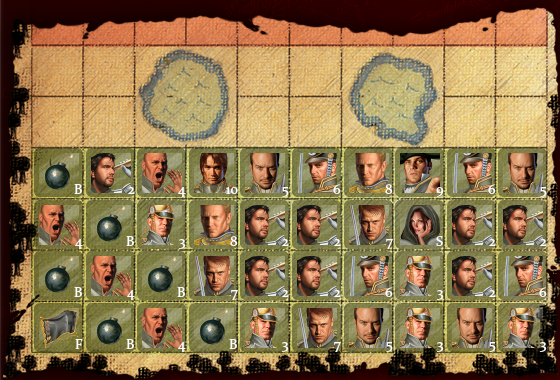
Example

The above example can be strong, because your flag is protected by two layers of bombs. It will likely cost your enemy two scouts before he sees the pattern. He might send two or three miners to clean them up, yet losing them in the process. If the flag is still behind those bombs and you manage to capture the remaining miners, then your opponent will have to take all your moving pieces to win.

But the left flank is actually weak since he could put a General and a Spy next to the bomb once he knows where your Marshall is. Then almost nothing can get past, unless you’re willing to exchange Generals. Then he can use a Colonel to block the passage, still knowing that the Spy will keep your Marshall away. You will have to focus on the other two lanes instead but if you weaken this left flank, then his General will enter your area through this opening while your strongest pieces are on the other side. Sending in the Miners to clean up is then quite easy, accompanied by a Captain to take away the Sergeants. Or just keep the General in that area while the other pieces hunt down your strongest pieces. It’s a pattern that has been used often enough so players will be more likely to walk around with Colonels on your first and second row, while their Marshall and General will keep yours in check.

In general, you will need enough space for your pieces to move around. This setup, although it is reasonable strong, will take away this freedom of movement once your pieces become less powerful than those of your opponent. (For example, because you lost a Major or Colonel.) This setup only works for as long as you’re at least as strong as your opponent.

Of course, there are two things you should try to do. First of all, try to become more powerful than your opponent by hunting down his General, Colonels or Majors. This way, your strongest pieces can block the lanes that your opponents want to use. And if your opponent blocked one lane with Bombs, he will surely regret it now. But remember that most players will keep the Spy near their General, thus you have to be careful when you hunt down this General with your Marshall.

Once you’ve taken a bunch of enemy Scouts, you should consider walking around with your Spy, and especially move it away from the Marshall of your enemy. I’ve had several occasions where I would move my Colonel or General together with my Spy away from the enemies Marshall. The enemy would then follow think I’m walking around with a Miner to clear away Bombs. So, in several locations, the enemy put his Marshall between my Spy and my General, making me choose which one to lose, but ending up very frustrated instead once my Spy slays his Marshall. (Which gets a very nice animation in this game!)

In one situation I even manage to get the enemies Marshall this way and immediately took the General of my enemy with my Marshall, knowing it was protected by a Spy. Why? Because now my strongest piece is the General, while my opponent only has a Colonel. Otherwise, that Spy would still be able to take down my Marshall if all other pieces are traded equally.

Still, having the strongest pieces isn’t enough. In one game, I knew where the enemy kept his flag and it was exposed from three sides. I had a General and Two Sergeants, but my flag was surrounded by bombs. My enemy had a Marshall and one Colonel, so all he had to do was capture my pieces and he would still win. Unfortunately, since my General was more powerful than his Colonel, he had to protect one side with his Marshall. My two Sergeants could approach the flag from the two other sides and his Colonel could only protect one side. So in the end, my last piece took his flag and I won with one Sergeant against a Marshall and a Colonel!

If your flag isn’t behind bombs, you can lose more easily. But if your flag is behind bombs, your enemy will know where to look and send down his Miners. A Marshall can’t win from two Miners even if the flag is behind bombs, simply because the Miners will walk through all those bombs. This is why it’s important to take all Miners your enemy has. Which is even true if your flag is in the open, since it forces your opponent to be more careful.

It is a good idea to keep your forces divided over both flanks. One Colonel on the left and one on the right. The Majors close to every lane, the Captains and Lieutenants in the front in the hopes of exposing your enemies strongest pieces and your scouts ready to scout once the first row is cleared up a bit. Miners in the back, preferably in a pattern that would suggest a layout of bombs. And your Marshall and General on both sides next to the central lane, close to the fourth line so they can block the center or one of the side fronts.

Also, keep in mind that if you know where your enemy keeps his Marshall, moving pieces towards him often suggests that you’re sending your Spy to capture him. Or your Marshall for an exchange. Use this in your advantage by faking these kinds of movements, or by moving your Spy away from their Marshall.

Also, keep in mind that when you’ve captured a Colonel or Major, it is time to exchange all pieces so you will have the strongest piece on board. Make good use of that advantage and it will increase your chances of winning.

Rabo Phishing

Katje Mail - 2013 Rabo Bank Algemene voorwaarden en informatieIt’s always interesting to see a bank like the Rabo warning me about the possible dangers of their systems by using emails like these. It’s even more interesting when you realise that I don’t have a Rabo account thus there’s no reason for me to use their software. So, yeah… It’s a phishing email, but for GMail it’s still a reasonable new attack so I don’t get an automated warning. (McAfee did detect a potential unsafe link, so that’s a second warning.)

Roughly translated, the message is telling me the bank is using a new security system which is supposed to keep me safe from any malicious software. All I have to do is link my system to theirs, offer some more information and then I won’t have to worry about my bank account. (Probably because they will plunder it to the last penny.) After providing my information, they will contact me by phone and update my account so they can collect even more sensitive data from me.

Well, this is a nice example of a phishing email. First of all, my bank should already know all information about me that they need. If not, I should receive a link to their official website with the proper logo’s and stuff, plus a secure SSL connection. By providing a “special link” that would allow me to add my information, they’re actually making me more suspicious. Normally, a bank would tell you to log in to the regular website and then select option X from the list of options to give more information.

Also, since modern banks will handle almost all client interactions through secure webpages, there should never be a need to install software that your bank provides! I even become suspicious when the ING started to offer an extra malware checker to all their customers, because even though this was a legit offer, it encourages people to install anything the bank tells them. This is bad, real bad! So, to all banks: please stop telling us which software we need to install and where to download it.

Basically, the mail is telling me to do things no ‘real’ bank would even ask of me. (If they did, I’d leave them for another bank.) But they’ve also sent this email to someone with no Rabo account, which is plain stupid since those people should recognise this as spam immediately and thus report it immediately. Gmail, for example, has a nice feature allowing you to mark the email as a phishing attempt. If a few people report this as phishing, it will be automatically sent to the spam folder for everyone.

But there’s more and for this I will have to look at the email header:

Received: by 10.50.78.199 with SMTP id d7csp60995igx;
Fri, 16 Aug 2013 01:08:54 -0700 (PDT)
X-Received: by 10.180.9.203 with SMTP id c11mr114146wib.64.1376640534320;
Fri, 16 Aug 2013 01:08:54 -0700 (PDT)
Return-Path: <informatie@rabo.nl>
Received: from web017.kontent.com (web017.kontent.com. [81.88.40.153])
by mx.google.com with ESMTP id vl2si80185wjc.138.1969.12.31.16.00.00;
Fri, 16 Aug 2013 01:08:54 -0700 (PDT)
Received-SPF: neutral (google.com: 81.88.40.153 is neither permitted nor denied by best guess record for domain of informatie@rabo.nl) client-ip=81.88.40.153;
Authentication-Results: mx.google.com;
spf=neutral (google.com: 81.88.40.153 is neither permitted nor denied by best guess record for domain of informatie@rabo.nl) smtp.mail=informatie@rabo.nl
Received: from 123salonmagie-pittelkow.de (localhost [127.0.0.1])
by web017.kontent.com (Postfix) with SMTP id 48F4C1906F
for <xxxxx@xxxxxxxx.xx>; Fri, 16 Aug 2013 10:08:53 +0200 (CEST)
Received: by 123salonmagie-pittelkow.de (KT-sendmail/237034); Fri, 16 Aug 2013 10:08:53 +0200
Date: Fri, 16 Aug 2013 10:08:53 +0200
X-Kontent-Script: http://123salonmagie-pittelkow.de/images/hdds/gtr/mailer1.php
X-Kontent-Sender: 41.137.57.141
To:xxxxx@xxxxxxxx.xx
Subject: 2013 Rabo Bank Algemene voorwaarden en informatie
From: Rabo Bank <informatie@rabo.nl>
Reply-To: informatie@rabo.nl
MIME-Version: 1.0
Content-Type: text/html
Content-Transfer-Encoding: 8bit
Message-Id: <20130816080853.48F4C1906F@web017.kontent.com>

One thing I immediately notice is that the email has an email address from the sender (informatie@rabo.nl) which seems suspicious valid. Most banks will have a no-reply address as sender since they don’t want their clients corresponding with them by email. Why? Because email is less secure. Thus this too is a warning signal.

The reference to ‘kontent.com’ is also suspicious. But when you visit this domain (it’s safe) you will see a domain hosting company that also provides web mail options. It tells me that the email has been sent through their servers. But the trail goes further. A german domain provider, which is strange since the Rabo is a Dutch bank. The domain registered at this provider is 123salonmagie-pittelkow.de and it seems to be down already. The WhoIs information makes it clear that the persons behind it want to be anonymous, so it’s registered by ‘Kontent’.

An IP address (41.137.57.141) is also noticeable. RobTex tells me this is an address in Morocco. An added descriptions shows “This prefix is dedicated to mobile 3G Internet users on the capital Rabat and its surroundings” which tells me someone is using a mobile phone or tablet to send these phishing emails from Rabat, Morocco.

Back to the domain I’ve found. Again, RobTex shows me it shares its site with dozens of other sites. Many of them look suspicious or are gambling or porn-related. That doesn’t really surprise me. These are all just hosted sites, with small sizes and not too many visitors. An ideal provider for a phishing attack. Especially since this provider allows their customers to send emails from a domain name (rabo.nl) that doesn’t belong to them.

The phishing attack is done in a smart way. Since the frauds are working on an international level, the risk of getting caught is reasonable small. They do seem to understand the Dutch and German language, but then again, these two countries have a lot of immigrants from Morocco. The fraud might even be in Morocco for a holiday, returning in a few weeks and thus removing his traces in Rabat.

To pay the provider, he probably used a hacked bank account or credit card. In Rabat, he could have stolen an iPad with 3G connection and used that to send the emails. On his domain name he probably used a simple script allowing him to send a huge amount of emails through the provider without warning bells going off. Then again, similar Rabo phishing emails are going around for two years already, with just a few minor changes. This fraud is probably doing this for a while now. It tells me that he has escaped being captured for quite a while.

But would he really profit from this? Well, the risks are small since he misuses systems in two different continents and is probably using fake names and stolen bank information to get the things he needs. With about 15 million people in the Netherlands, he might just mail 10% of them, hoping that 1% of those will click the link and offer at least some information. If 1% of this information is valid, he will have collected 150 valid bank accounts. If he can “steal” 500 euro’s from each of these accounts, he will have earned 75.000 euro’s, which happens to be a very nice amount. If he can keep 10% of this amount and spend the rest on expenses, it would still keep him well-paid for two months. Longer if he lives in Morocco.

Basically, people who fall for this fraud will be sponsoring some criminal in Morocco. When you realise that several muslim-extremists have ties with Morocco then this kind of fraud might even be sponsoring terrorism. Thus it’s very important that people are very careful with these kinds of emails. And even more important: never communicate with your bank by email, since it’s unsafe. You can use their website, if it uses SSL. Otherwise, use the phone to call the bank when you receive emails like this and ask them what to do. Don’t use the phone number from the email but from your bank statements or from their official website. Also, keep in mind that no sane bank will ask you to install any specific product, nor should they offer you an email address for your replies. If a bank does do these stupid things, complain to them! Switch banks if you have to, since those banks are taking too many risks.

The King, the Queen and the Messengers…

Long ago there was a palace with two towers. In the West tower, the King had his office where he would meet with his Ministers and other staff to rule the country. In the East tower, the Queen had her office from where she would regulate the Palace staff, take care of the Royal Heirs and to take care of all social State Affairs. A hallway connects the two towers and has some side rooms for e.g. the Prime Minister and other important State people and guests to reside.

This will be a discussion about messaging systems in the computer world, using a monarchy as an example. The King would be a main process on a single machine, either virtual or real. The Queen is another process, most likely running on a second machine and meant to keep the main system healthy. (The heir would replace the King if something would happen to him.) The other rooms would be other processes, most likely on other computers that the King or Queen would need to get data for their decisions. And the hallways are the network, connecting all these processes.

If the King and Queen and all Ministers and guests would be in the same room, communication between them would be very simple. But when you take into account the size of their staff and have to fit it all in a single room, you’ll soon discover that it won’t fit. The same applies with having all business logic within a single process or on a single computer. The amount of memory or disk space is limited on computers and you’re risking that you’ll run out of space soon enough. You would have to reduce the size of the processes, meaning getting rid of some ministers and guests or (in computer terms) data. But it would be more practical to divide it all over more rooms, which will allow the staff to expand more, thus contain more data.

So the royalty divides itself over several rooms in the Palace, with the King and Queen having the best and most practical rooms: the towers. This does make communication between them more difficult. Still, if the King wants to tell something to the Queen, he could go down his tower, walk through the hallway, climb up the Queen’s tower and then tell her what he wanted to say. This trip could take him 15 minutes and once he’s done talking, he will have to go back again. Thus the King can’t do his own work during at least 30 minutes.

In computer terms, this is equal to synchronous communications. And to be honest, it was quickly decided that this would never work. You can’t move a process in the context of another process on a different machine, let them work together and then bring the process back again. (Well, you could, but it’s just too complex.) So this has been solved by the use of messengers. Or, in TCP/IP terms: messages.

So, the King would write what he wants to say and puts the letter in an envelope. He calls the messenger and gives him the envelope. The messenger then runs to the Queen and gives her the message. The Queen then starts to write an answer, put it in an envelope and will use the same messenger to send it to the King again. Meanwhile, the king knows the trip will take 30 minutes and calculates the Queen will need 10 minutes to write the answer. Thus he will wait 40 minutes for the messenger to return before he can send out the next message. If the time is up, he will have to assume there’s an assassin in the hallway who killed his messenger and will just call in a new messenger.

When the messenger returns, the King picks up a gun and kills the messenger! He doesn’t need any messenger until his next message so why waste food or attention to this messenger? The body can go down the garbage chute and the garbage collection will deal with it.

This is a basis for the synchronous communication which you will see in many Internet-based applications. It’s not really synchronous, since the process can still continue to do other tasks that don’t need anything that will be in the answer from the Queen. Basically, a thread is started to send a message to the other process and then wait for a reply. If the thread returns with an answer, the thread can be closed, destroyed and will be picked up by the garbage collector to free resources. If it does not return in time, the process will have to assume something happened to the message, thus an alert should be raised and actions will have to be taken to discover why the message failed. These discussions can include checking the network for errors or just sending the message again with a new messenger.

It’s not really a synchronous process, since the King can decide to do other things, but the King can send only one messenger at once, so he will have to wait before he can send another message. Still, killing the messenger seems to be a bit “troublesome”.

So the King decides to have a collection of messengers ready to send messages. He knows he needs about 4 minutes to write each message while the Queen needs about 10 minutes. Thus he needs at least 10 messengers to continuously send messages to the Queen. When the messengers return, he can put them back in his collection, thus re-using his resources instead of wasting them.

In computer terms, this translates to a thread pool. Simply put, the system creates an area where it can keep threads that it don’t need for now, so it doesn’t have to spend time on creation or destruction of these threads. The process is still synchronous, since the King expects messengers to return. And if messengers are delayed, he might run out of messengers so he would need a few more, just in case. He can always order one more messenger, but it takes some time to assign this job to some random citizen who happens to be in the Palace at that moment. It is effective, since it allows the King to continue working and to continue sending messages to the Queen. He only gets in trouble when he needs an answer from the Queen before he can continue working. But while he hasn’t received the answer, he could still work on other tasks.

But what if the Queen also wants to say things to the King? Does she wait until the King sends her a message and add her sayings to the response? That would not be practical, since she never knows when a new messenger will arrive. What if the King doesn’t have anything to say? So the Queen will also have her share of messengers, just like the Ministers and the guests. Thus, they can all send messages when they like and wait for the responses. And how much messages they need depends on the distance to the receiver and the amount of time the receiver needs to write the answer.

For example, the Prime Minister might have a room next to the West tower. Thus, his messengers would only need to travel 5 minutes to the king and then wait for 4 minutes, since the king writes really fast. If the Prime Minister needs about 7 minutes to write his messages, then he just needs 3 messengers to be able to continuously send messages to the King. But if he also wants to communicate with the Queen, he will need more messengers since that distance is longer and the Queen writes slower.

In all these cases, we’re dealing with a request/response system, which is basically what most websites are. The browser sends a request to the server and waits a specific amount of time for a response. If a response doesn’t return in the proper amount of time, the user will be told that there’s a technical problem. There’s no way of knowing if the request failed to arrive or if the response failed. What, for example, if the Queen was assassinated? Dead Queens can’t reply. And a new Queen would be needed to get all operations running smooth again. But making a new Queen takes time. And in the Real world, the King would have to approve the new Queen, but fortunately on the Internet, the user would never notice the replacement of the web server, except for the temporary time during which they won’t get responses. Kings might be mourning the loss of their Queen, but visitors of your website won’t care if you’ve replaced your server, as long as they get their responses…

You could, of course, save downtime by having a second Queen prepared and ready when the first one dies. Basically, you would build a second East tower and have a sign telling the messenger which tower he should take to visit the Queen. You could even have two Queens at the same time, letting messengers decide by random which Queen they will visit. Unfortunately, since the Queens don’t know what the other Queen has said or responded, the King might receive some strange messages. Thus the Queens would need more messengers to send carbon copies of every message sent or received to the other Queen so they both know what’s going on.

Still, in this system we wait for responses after every message. What if we decide to stop waiting?

So, we start anew. The West tower holds the King with a collection of messengers. A bunch of citizens are in the area, who can all be promoted to messengers if there’s a need for more messengers. At the east side, we now have two towers, each holding a Queen and each holding a collection of messengers and more civilians who can be promoted. The same is true for the Ministers and the guests.

So, the King writes a message and tells a messenger to deliver it to the Queen. The King then starts working on other tasks, delaying those for which he needs an answer from the Queen. He basically forgets about the messenger and won’t wait. He just calls for another citizen to be promoted to messenger The messenger decides to take the left entrance for the East towers and gives his message to the Queen. Then he’s downgraded to citizen again, free to walk around. Most likely his proximity to the Queen means he’ll be promoted to messenger real soon again.

The Queen writes her message in reply to the King and gives it to her messenger. Her messenger is on its way and a citizen is promoted to messenger while the Queen continues her work again. When the messenger arrives at the West tower, the King remembers the task again that he had delayed. Since he now has the data he needs, he can continue this task again as long as no other task has a higher priority.

This is a pure asynchronous process. It’s advantage is that you don’t have to wait anymore. All you do is delay tasks until the moment that you can actually do something again for this task, which generally occurs once you have a response. until then, the King just can say that he can’t finish the task, since he doesn’t have data.

Of course, there are drawbacks. The King will never know if his message arrived. Does he need to? If he just wrote “I love you.” to the Queen, does he even need a response? Yeah, it would be nice if she responded with “I hate you and only married you for your money.” but it’s just optional. (And no, this is no love story!) The same is true for messages in the opposite direction. The Queen might send messages to keep the King up-to-date without expecting even a thank-you note. An asynchronous system is ideal in situations where you’re not really interested in responses, just regular status updates. Status updates are needed just to know the other sides are still alive.

But let’s make things more interesting… The King decides to have multiple Queens and marries about 40 different women. Every Queen gets a tower on the east side. This way, the King can produce plenty of heirs and knows that the social parts of his court are well-tended for. He will still send messages to the Queen, but the messenger can just pick one at random. If one Queen is unavailable, the messenger just goes to the next one.

This is a practical advantage of asynchronous messages. You don’t care who picks up the message, as long as it’s picked up. You’re not waiting for a reply either. If the Queens are supposed to reply in some way, it doesn’t even matter which Queen replies, as long as there’s a reply. This would be a system where a service is replicated on several different machines in several different processes. It allows the system to continue working without the King even noticing that half of his Queens are assassinated… Or if half the machines are down for an upgrade.

The drawback is, of course, that the Queens don’t know anything about the messages the others have sent or received. This might be troublesome, since they might receive a message from the King as part of a longer discussion, but they just don’t know what the discussion is about or what has been discussed before. So, every Queen will have to make carbon copies of every message, sent or received, and forward these to all other Queens. With 40 Queens, this would make the hallways between the East towers very busy with lots of messengers.

Another solution would be if every Queen would send a carbon copy to a “Mother-Queen”, a Queen to rule all other Queens. This way, the Mother-Queen would know about all discussions and there won’t be 40 messengers needed for every message to the Queens. Now you need only two. One that the King has sent and one the Queen sends to the Mother-Queen.

The Mother-Queen will collect all incoming copies and once in a while send these to the other Queens as updates. This way, each messenger would carry dozens of messages every time to keep the other Queens updated. It does increase the risk that a Queen receives a message from the King without knowing the previous discussion but all she would have to do is wait for the Mother-Queen to send the update so she will know what the discussion is about. besides, the King isn’t expecting an immediate answer so any reply could wait.

Something similar can happen in an asynchronous system. A message could be received by a listener that’s part of a longer discussion. The listener would then just have to wait until it received the previous parts of the discussion. Since asynchronous systems don’t reply, the tasks that are needed to be executed in response to these messages can be delayed.

So, how does this translate into computer processes? Say, for example, that every Queen is a process containing a copy of data from a database. As long as all systems have the same copy, it doesn’t matter which one you will ask to insert a new record. Process 21 might receive it and then tell the Master process to do the same update. Once in a while, the Master process will send a complete list of all updates received to all other processes and they will all be synchronized again.

Things do become more complex when you’re sending a request for data to one of these processes. Because now you’re going to synchronize a request with a response. If process 21 receives the request, it can respond with data including the newly inserted record. But if process 36 receives the request, it still doesn’t know about the insert, thus you will receive outdated data.

Basically, this means that you will have to share updates between processes real fast. You could, for example, send out 40 messengers with carbon copies of the insert message, or you will send a single messenger with 40 carbon copies and let him go past all other Queens systems. Hopefully, all systems will receive the update in time, else the King might receive responses that don’t really match with one another. This synchronisation of incoming updates make things difficult when you have many processes that all do exactly the same job.

So, let’s focus on the Ministers instead. You have one for Foreign Affairs, one for Healthcare, one for Internal Affairs, one for Military purposes et cetera. Basically, they all have different jobs, although they do share some common knowledge. Here, you can send a messenger to a random Minister and the Minister will have to look at the envelope to see if he can do something with the message. If he can, the messenger becomes a citizen again and the Minister starts working. If not, he will tell the messenger to try the next Minister.

This too is a design pattern in the computer world. Basically, these are messages where trial-and-error is used to find a specific system which will be able to reply. With too many listeners there will be a serious delay until the message finally receives the proper place but then again, no one is expecting a reply to the message so there’s no real hurry.

So, when to use which system? Generally, when you’re dealing with users of your software, you have users who expect responses to most of their actions. But not all! For example, if a user requests a web page, they expect a page. But if they save a file to disk, they don’t want a response telling them it was successful. They’d only expect a response if something failed.

But when you design web sites, you enter a world which basically has mostly asynchronous systems. Asynchronous systems which have a synchronisation layer on top of them to make usage easier, but which will also cause delays. If speed is important, you would prefer to use asynchronous processes because many actions might not need an immediate response. Basically, this would allow you to send several messages to other processes, which in turn send new messages to more processes until one or more will start sending answers back so you can respond to the user.

And if you don’t get responses back in time, you can tell the user that you could not collect all data he wanted and possibly even tell him what data you’re still missing. The user will not be waiting forever, but the notification to the user could be that you’re processing his request and that you will tell him later when you do have the required data.

And this is practical when your user is asking for complex things like large reports in PDF format. It takes time to collect all data and then convert it to readable text. In an asynchronous system you would tell the different groups of data processes to collect the required data and to send it to the data-processing processes. Those would then convert the incoming data to practical tables and other overviews and send them to the report builder process. The report builder would then create pages for all processed data and turn them into pages of the report, and when all data has been received it can send the report back to the master server. With a bit of luck, the report can be part of the response. If not, the report will have to be stored until the system has a chance to tell the user that there’s a report available.

Fortunately, with modern web browsers that support HTML 5 you can use Web Sockets. With a web socket the web page can open a communication channel with the web server, thus when the web server receives the report, it can tell the user that the report is ready to be downloaded. With older browsers, you will have to fall back on polling mechanisms, where the web site makes continuous requests to the web server, asking “Is it there yet?” Annoying, but polling is the only solution with older browsers or servers that don’t support web sockets.

Still, many people don’t realise that even a web page uses asynchronous messages for its communication. It’s just that there’s a synchronisation layer on top of those messages which makes it seem synchronous. But if the server doesn’t respond in time, the browser will still tell you that it didn’t receive a reply thus it has nothing to show. The browser is just delaying its task while waiting for a response.

This is something you can see more clearly when you open a page with multiple images. In general, the browser will ask for the page, which will result in a response. But the browser notices it needs to load several images now, so it starts requesting those images, and while it’s waiting to download those images, the user will just see the “broken image” icon but he’s still able to use it.

The same is true when you include JavaScript files or stylesheets in your web page. The browser downloads your page but will notice that it needs to download more files before it can render the page for the user to view. It will try to allow the user to do something as soon as possible, yet it has to wait for all those responses or just generate a time-out when it runs out of time.

Like the King and Queens who talk with one another through asynchronous messages, so does the Internet communicate between servers. Systems will send messages and then wait until they know they have received the data they need or a specific time limit has passed. Keep in mind that there’s nothing really synchronous about the Internet, except that most users will think it is a synchronous process.
Just a Byte…

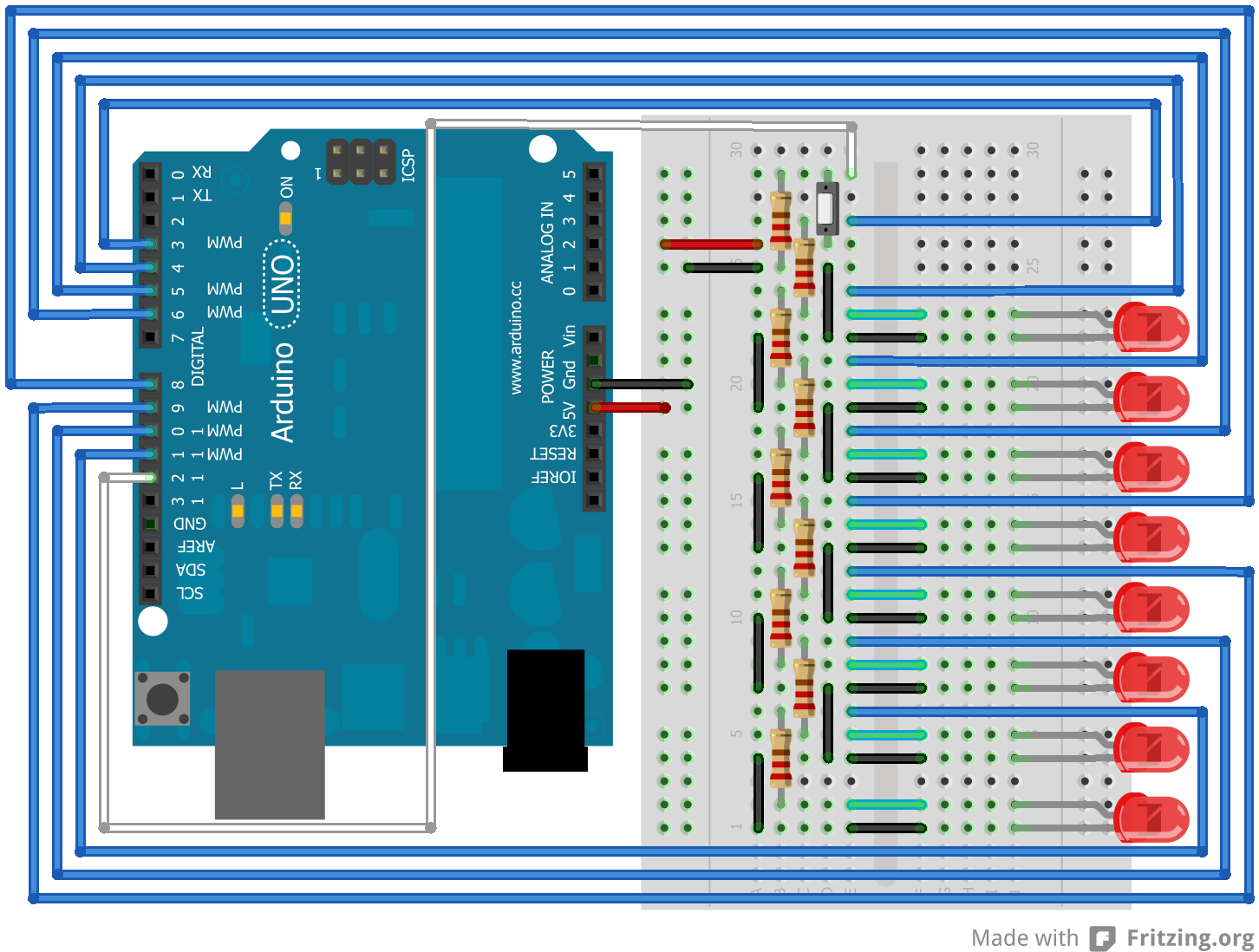
I recently started with the Arduino hardware and decided that I needed to create something electronic to command from this specific hardware. Since I am a software geek, I immediately came up with the idea to visualize a byte by using 8 LEDs. I also wanted a simple switch in the design so I could give it some special function, although a single switch isn’t offering very much functionality. So the first design used a broadboard and lots of cables to connect it all and looks something like this:

Byte_bbYeah, that’s a lot of cables. And 8 LEDs, 9 resistors and a switch. It’s nothing spectacular, though. But this design does need to use 9 pins from my Arduino board, making it a bit pin-hungry. You might want to prefer to have all communication to go through a single pin, plus two more for ground and power. But I decided that I just need an experimental thing that would use several pins.

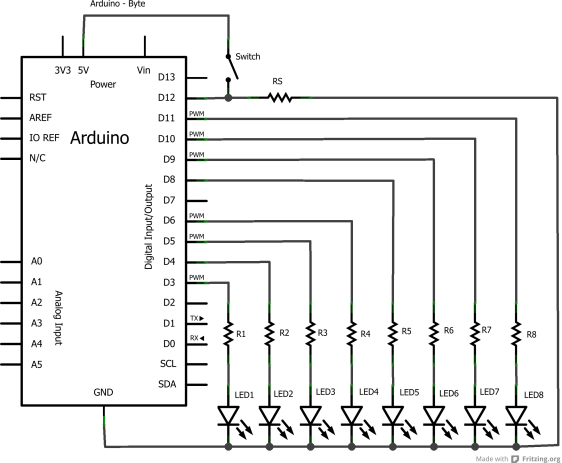
When you look at its schematics, it looks like this:

Byte_schemAnd now, weeks after creating this design, I still wonder why I added a resistor between the switch, pin 12 and ground. Then again, if I would use pin 12 as an analog input, I would not just get a signal when someone presses the button, but also a very low signal related to the number of LEDs that are burning. That’s an interesting concept but I still have to test it.

However, this setup isn’t very practical. All those wires, the LEDs that are a bit loose within the board and the switch that didn’t really want to stay in place made it a bit complex to handle. So I decided to use their services to create a Printed Circuit Board. It would some time for them to fabricate it, though. But still, it would be neat to have some board that I can just click on top of my Arduino.

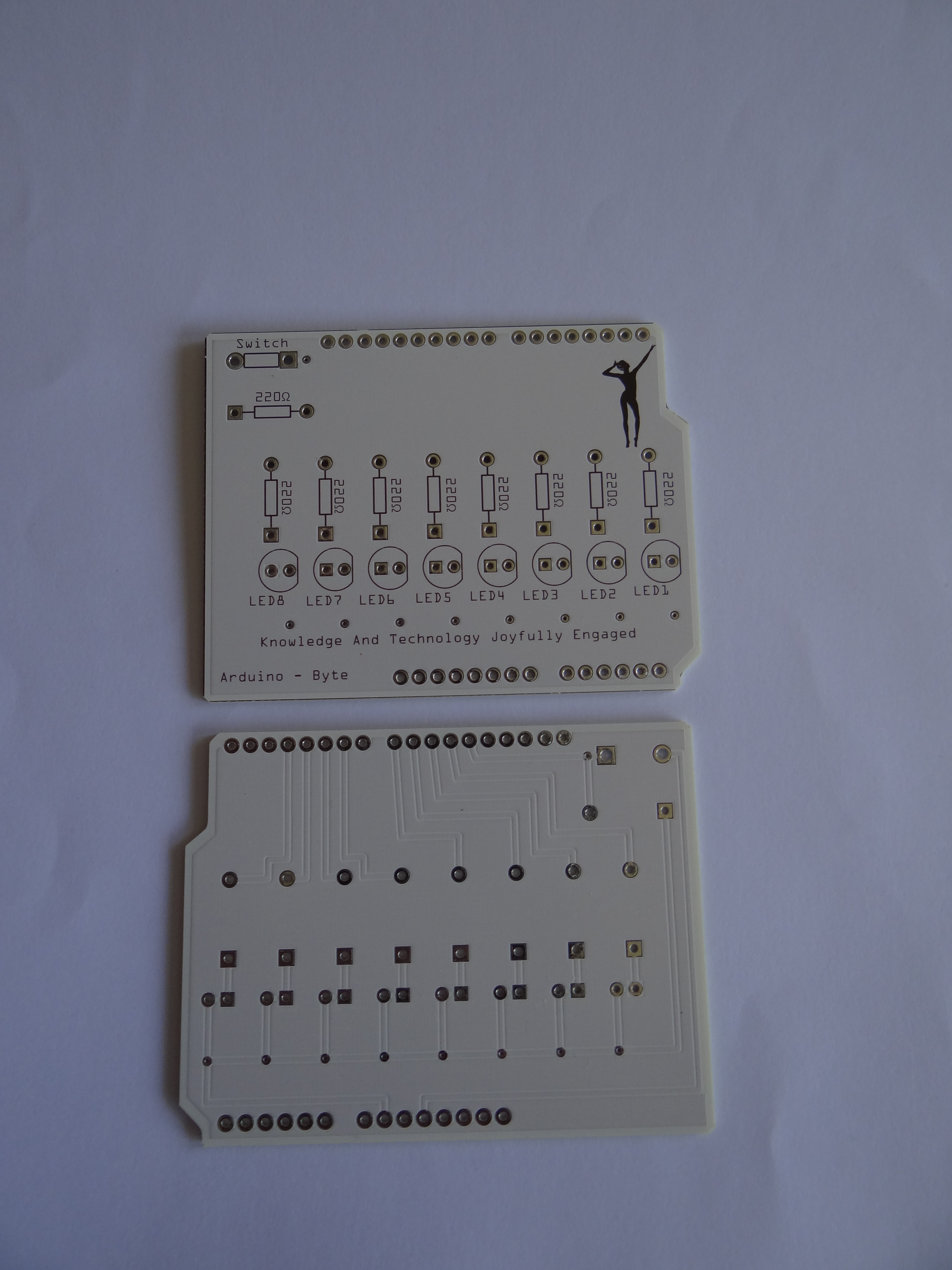
So, recently I received four of these in my mailbox:

PCBInteresting effect: while the text, logo and instructions are in the front, the actual connections are on the back of this PCB. Did I do this on purpose? No, not really, but I like the effect. It makes the front very smooth, making it even prettier to show. And the logo in the shape of a woman stretching her arms serves the same purpose. Just there to make it look more interesting.

The next step was to add all the LEDs, resistors, the switch and the connecting pins to the PCB. That took some patience with soldiering but I’m happy to say it was a success:

BitsAnd yes, the BytePanel code for this project was also quite easy to write, although C/C++ isn’t really my speciality. (I prefer C# or Delphi/Pascal, although I have plenty of experiences with lots of other languages.)

To get this panel to work, I needed a simple piece of code that would set or reset the specific pins that are assigned to the LEDs. And I need input from one pin to detect if the user presses a button. But to make things more practical, I would need a special class for this whole thing. So it was time to write a whole C++ class including header.

class BytePanel
{
  public:
    BytePanel();
    boolean isPressed(); 
    void reset(); 
    void loopBits(); 
    void loopBitsReverse();
    int next(); 
    int previous();
    void set(byte value); 
    void setValue(int bit, boolean value);
  private: 
    // The current value
    byte currentValue;
    // The pins
    int pins[8];
    // The bit masks
    int masks[8];
    // The switchpin
    int switchpin;
    void update(); 
};

This class would need a constructor with the intelligence to set all used pins to either input or output. It would also need to initialize all variables used, including the counter value which remembers the value of this byte.

Next, it would need a simple function to either set or reset a specific LED. This is what setValue is supposed to do. This method is called a few times, since any method that sets or resets bits will need to call this method for every bit.

The function set is a bit more practical, since it accepts a byte value and sets the LEDs to this specific value. However, it will not influence the current value that it stores internally. I could add this but I feel it would give too much functionality to this simple method. Besides, if I want to be able to set any value to the current value then I would need to create a property to get/set the value, instead of keeping it read-only.

Then a few methods called next, previous and reset that will display either the next value, the previous value or reset this counter to 0, which means no LED will be burning. They all call the update method which is used to display the current value. Which is practical if you’ve used the set method to override the value.

Two methods called loopBits and loopBitsReverse will just flash each led for 20 milliseconds. The first method goes from low to high and the other from high to low. These are just fine to call when you start the device, so the user gets a visual sign that the device is working.

This class actually makes it quite easy to use the button to increase the byte value. When the device starts, I just loop the bits before resetting the byte. Then, when the user presses the button I will call the next method to move to the next value. However, I also want to reset the byte, and decided that I need to press the button for half a second before it would reset. And to make things complex, the byte should not increase for as long as I keep pressing the button.

Well, this wasn’t that complex after all:

// Now wait for up to half a second.
 int count=50;
 while(count>0){
   delay(10);
   // Did user release the button again?
   if(!panel.isPressed()) break;
   count--;
 }
 // If count is 0 then the user wanted to do a reset.
 if((count==0)) {
   // Reset the byte.
   panel.reset();
   // Wait for user to release the button.
   while (panel.isPressed())
   {
     delay(10);
   }; 
 }

Basically, when the button is pressed, I increase the byte. I then enter a loop that will break if the button is released, or else end when it has counted 50 x 10 milliseconds. In the latter case, the counter will have reached zero, thus I need to reset the byte. I also need to wait for the user to release the button again, else the counter will start at one, not zero. (Because the button is pressed when it iterates from the start again.)

It’s not very complicated to do, as you can see. And of course I could add even more functionality. For example, if the user presses the button for half a second, it should light all LEDs and then move in reverse order, thus every new press of the button would call previous to decrease. Press it for half a second again and it will move forward again. And press it for a full second and it will reset itself.

It’s just one button so I can’t add much functionality to it anyways. But I’m still proud of my first Arduino project. It’s small and it looks nice. I can connect just a battery to it, like in the picture, then press the button to show a specific 8-bit value in binary. And… Well, that’s all, actually. 🙂

But what’s more important: I now have a piece of electronics which I can use to write software for! For example, I could use a serial connection to send bytes from the computer to display as bits on this device. Maybe even make it communicate with a second Arduino device so one will send values that the other will display.

And I have three more PCB’s that I can use to create three more of these simple devices. 

The Arduino and the Raspberry Pi.

As you might know, I’m a software engineer. Senior, even. Creating software isn’t just my daily work, it’s also my most favorite hobby, and I invest a lot in my own personal knowledge. I’ve been using a legal Delphi version since 1995 when Delphi 1 was marketed. Before that, I owned a Borland Pascal 7 compiler, allowing me to write both MS-DOS and Windows applications. (End before that, I owned Turbo Pascal 6.) The same with Visual Studio, which I owned myself since the first .NET version was sold. I did skip version 2005, but purchased the 2008, 2010 and the latest 2012 versions, just to keep up with the latest techniques. I also have a license for SQL Server Developer and I use Altova’s Mission kit on a regular basis too to create XML schema’s and to process XML files by using style sheets.

But all this is just working inside the box. You do something on the computer and when people ask me what I do, I have to turn on my computer or laptop, start whatever I’ve created that I can show and once the demonstration is done, I can close it all up again. And after many years, I’ve decided that I need to work “outside the box” too! I need something I can show without the need of my computer, but it should still work together with my computer. And thus I arrived at the Arduino and the Raspberry Pi.

So, let’s start with the Raspberry Pi:

OLYMPUS DIGITAL CAMERA

Basically, it’s just a mini-computer which you can use to run Linux. And by using Linux, you could create all kinds of applications by programming them in C++, Python, PHP or any other development system that is available for Linux, and which can be ported to the Raspberry Pi. (Because it uses an ARM processor, which you can also use for mobile phones and cheap tablets.)

But when you look at the little board above, you will notice it has a bunch of pins available, which you can use to connect all kinds of hardware to this little board. And no, it already has a port for USB devices and a HDMI connector and even has a SD card reader so that’s not the kind of hardware that you need to connect. So, what kind of hardware can you connect?

Actually, anything you like! But you will have to be aware of the programming to send signals to the connected hardware and make sure you use the right voltages, else your hardware might burn up. You could, for example, connect a LED light to two of the pins and send a signal to one of those pins every second for half a second. You would then end up with a flashing light.

However, the 3.3 volts the Arduino provides is a bit much for a LED light so chances are that it will break with a final flash. So you need to take more precautions and add a resistor to the setup to lower the voltage. And maybe you want to do more than just create a flashing light. You could add a switch button to turn it on and off manually. Or maybe add a light sensor so it only turns on when it gets dark. Maybe you want to create a warning signal, telling you when your computer overheat by adding a thermometer circuit to your setup. And maybe add a motor and some wheels so your computer can drive around.

But to do all that, you would need something to create your electronics on. A printboard would be nice, but would require soldering, thus you can’t re-use any parts once you’ve used them. Thus you could use software like Fritzing to first create your electronic designs, which you can then put on a broadboard with all more components:

OLYMPUS DIGITAL CAMERA

yeah, that’s plug&play. 🙂 On the top left you see three light sensors. Next to it a bunch of resistors and a collection of LED lights. On the bottom the broadboard which you can use to plug them all together. And you’ll probably want a bunch of other electronic parts like condensators, wires, buttons and a lot more. All inexpensive parts that you can buy in the average electronics store. (And often used with model trains…)

So, you can use the Raspberry Pi to create your own light system, but isn’t it a bit overkill to use a whole computer just to switch on a light? Yeah, sure. Which is why the Arduino board happens to be a nice, and less expensive alternative:

OLYMPUS DIGITAL CAMERA

On the right you’ll see the Arduino Uno, which is a programmable board with just a little memory and a bunch of holes that you can use to connect your hardware. The Raspberry Pi has pins, but the Arduino has holes, which makes it easier to plug in wires.

On the left, a special Ethernet shield, which happens to have lots of pins in the bottom to connect to the Arduino board. It’s basically an extension to connect your Arduino to the Internet, so it could, for example, send or receive commands from any computer. And this is what makes the whole device very interesting! You can “talk” to it over an Internet connection.

However, to make the shield and board work together, it needs to use some of the pins that you might want to use for your own experiments instead. So there’s an Arduino board with a build-in ethernet connection:

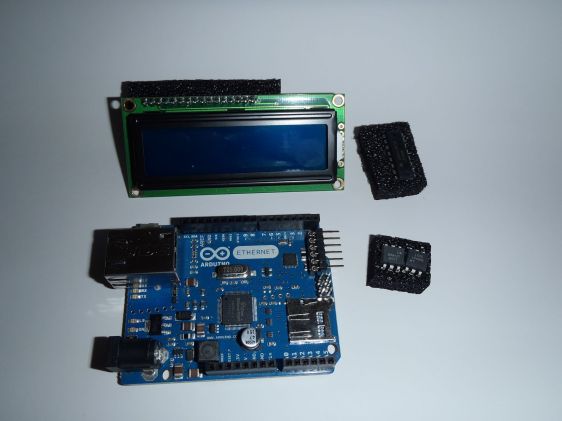
OLYMPUS DIGITAL CAMERA

And yes, above the board you’ll see a LCD screen that you could use to display messages. You also see an IC that can be used for some simple processing of your signals that you’ll be sending over the wires. And two optocouplers that can be used to isolate two systems with different voltages, yet allowing signals to be sent between them.

The Ethernet board does lack a USB connection, though. Then again, if you want to create your own internet-enabled electronic device then this is just more than enough as the foundation of your project.

There are also several other types of Arduino boards, each with their own special properties. I don’t have those yet, though.

The Arduino is very useful for projects that don’t need a lot of coding. Otherwise, the Raspberry Pi would be a better solution. The Raspberry Pi can, for example, be used as a web server, allowing you to send much more complex signals than the Arduino can handle. Plus, you can connect a monitor, keyboard, mouse, hard disk and other devices to your setup, like this interesting monitor:

OLYMPUS DIGITAL CAMERAAnd yes, it could be possible to use this monitor from an Arduino board but the amount of programming you’d need would be huge, and the amount of memory the Arduino has would not allow you to do something complicated. So, if you want to create a photo frame with a special remote, the Raspberry Pi would be more practical. If you want to set the lights on your model train station based on the amount of light outside, the Arduino would be better.

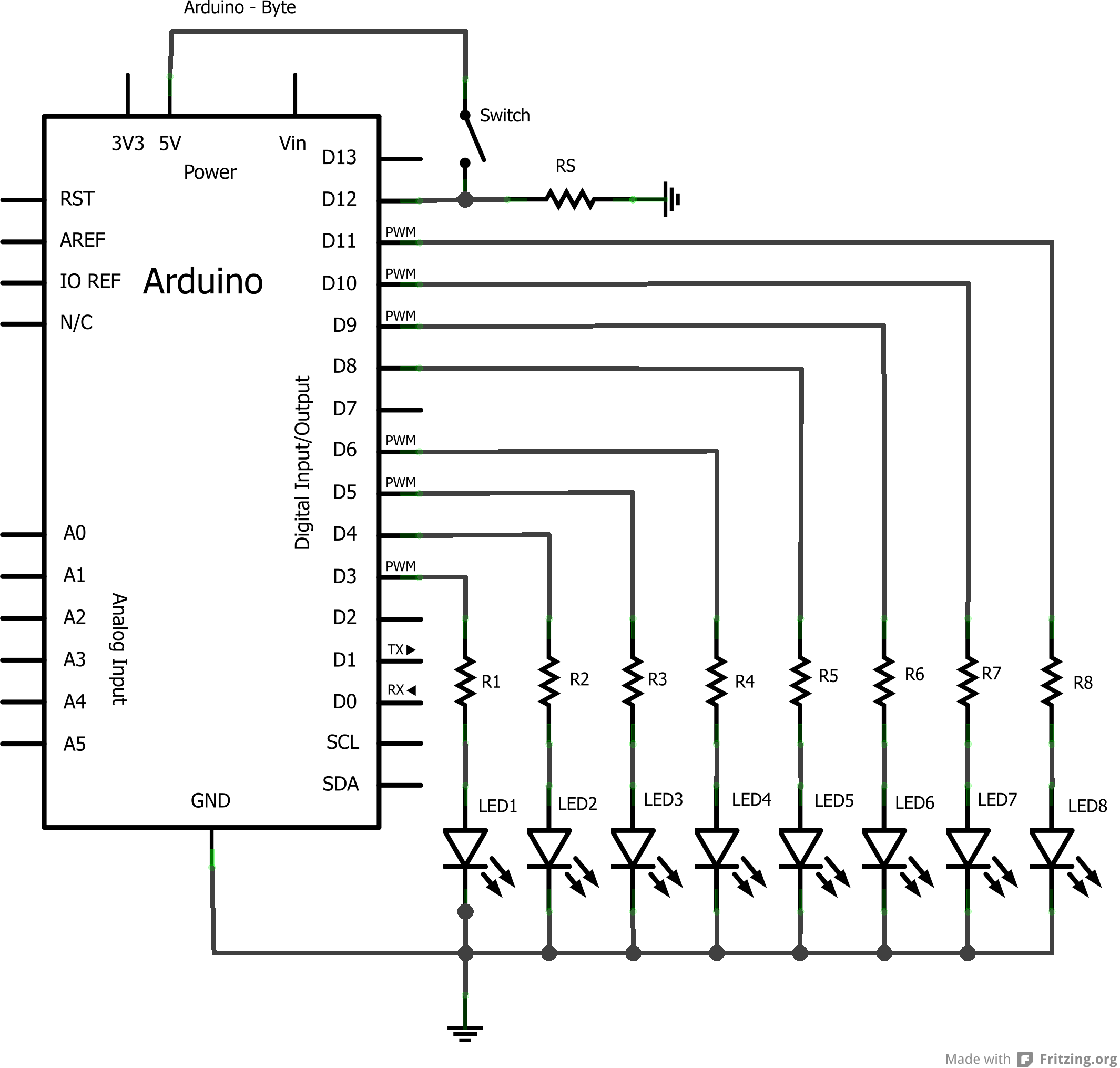
The Arduino has another advantage, although the Raspberry could make use of that option too. The Fritzing software allows you to design something and show what it would look like on a board. Say, for example, that I want to manage eight LED lights by using a switch. For example, a binary counter which displays it’s current value as a byte value. As an electronic schema it would look something like this:Byte_schema

In the above schema I use nine pins from the Arduino to handle all lights and the switch. And yes, I could have used just one if I added an IC and some additional components but I want to keep this extremely simple. Besides, using an IC means that I would have to use serial communication between the Arduino and the board, while I want this project to do things parallel.

But above schema is interesting but you might want to build it so you can test if it works. You should also build it so you can test the code for the Arduino which should do some action based on pressing the button. This has not been defined by me so I could use this all, for example, with an Ethernet board and have a computer send or receive a byte value to the board when I press the button. 

Anyways, the Fritzing software can display me what the board would like, although I did show all wires reasonably neat around the board:

Byte_bb

But once my design is finished, I don’t want to lock up my broadboard just for this project. I might want to create another thing next, thus I would need my board and my components. So, the solution would be to have a circuit board printer for just this project, which would look something like this:
Byte_pcb

A simple design, which fits a single side of a board, allowing me to add the components that I used on the broadboard before. A bit of soldering, adding a few pins to connect it to the Arduino board and I would end up with an interesting device, which still needs some code to operate the lights. But hey, this is the hardware side, allowing me to show something outside the box!

The next step would be writing the code for the Arduino itself, which should turn on or off some of the lights based on certain conditions. And it must respond to a button press. But what this project is going to be, I don’t know yet. A connection with a web server, having some kind of communication between my board and the web server would be something interesting to show. It would allow me to go back to the box, design something and then show the result on my Arduino board, which could be build in some black box with just the LED lights and the switch visible.

Too bad it would still need a cable to my router, but there are possible alternatives. For example, there’s also a WiFi-based option, or something with Bluetooth. Or perhaps even with a GPS module and then sending SMS messages. There are a lot of options for me to work outside the box with just these components!

By the way, since the Raspberry Pi has a build-in USB connector, I could just use a WiFi USB dongle instead of the Internet cable to make it a wireless device…

Time for a new web server…

Today I’ve received my new computer, which will be used as a Datacenter/web server. It’s an Asus P6-P7H55E and I will install Microsoft Windows 2012 Datacenter on it. It will be used mostly for my personal web experiments but it will be linked to my domain names.

I’m using Windows 2012 simply because I’ve received a license for this operating system as part of my MSDN subscription. It’s not meant to be used as a production server but as a development server, for testing purposes. I’m a Senior Software Developer so its perfect for me. I already upgraded it’s memory to 8 GB and wonder if the 512 GB disk space will be enough. Then again, I have plenty of external hard disks that can be used for extra storage.

It has an Intel Pentium E5800 onboard, which happens to be pretty decent. The system won’t be very powerful but then again, I don’t expect many visitors either. Those who do visit are most likely visiting my sites that are hosted somewhere else, like this blog. But for experimental purposes, it’s great. I hope, since I still need to set it up correctly. 🙂

I won’t be hosting my blog on it. My blog is nicely hosted on WordPress itself. I’m also not going to use it as mail server, since I use Google Apps for that purpose. And no, if I ever create a useful site that attracts hundreds of visitors every month, I’m probably not going to host it on this server either. Just my personal experiments, although these will be accessible from the outside.

The content of this web server won’t be very valuable, since I will do development on my other systems. And important data will also be stored on my other systems. I am considering to change my previous web server to an SQL Server system, almost completely dedicated to maintaining the more important databases on my system. Since my old web server will not be accessible from the outside, it would make my databases a bit more secure, although it also means that I have to keep two computers running continuously.

For now I still have plenty to do. It still sees only 4 GB RAM instead of 12 and it doesn’t seem to know it has a dual-core processor. And the remote desktop services aren’t operating properly yet. Plus, I need to give it a fixed IP address. And then I’ll have to migrate all projects that I consider important. Finally, I’d have to adjust my router to make sure the new web server will be used. And lots and lots more…

For now, I’m busy! Please, do not disturb… 🙂

Creating a nice CGI landscape.

I want a new background for my desktop system. But it’s a dual-monitor system with two monitors with 1920×1200 resolutions. This means that I have to make a very wide image. So I decided to make a wide landscape image. But I don’t want a bunch of trees, some mountains and water, but also some models inside the image, doing something. So I’ve decided to make it a hunting scene. On one side, Raevin with a dangerous gun who is hunting a Brontotherium on the other side. So I first need to create and pose them in Poser. And to make it easy, I just put them both in a single model. I can split them again once it’s imported in Vue. So, here are the models:

Main charactersOf course, I will make them look at one another in Vue. As I said, I will split it in Vue. Just needed to create a proper pose first.

The next step is starting Vue, set the image to 4800×1500 pixels which is the proper scale for my two monitors. I will have to re-size it later on to 3840×1200 to make it fit perfectly, but the larger resolution will also allow me to cut out part of the image as separate images. But size won’t be enough. I need to pick a proper atmosphere, the flow of the landscape, the trees and grass I want and of course I want to add water since that big monster would look nice with his body partially reflected. It also means adding some small splashes and ripples.

So, the atmosphere first. It should be sunny and a bit cloudy, but no real visible clouds. A nice sunset would look great. So I start with this:

Atmosphere

Next, I need to decide where I want the models and have decided to place Raevin on the left, so the prey is on the right. The sunlight from behind will make his shape a bit darker, thus more menacing. The same will be true for Raevin, but I will add a second light on Raevin so she becomes more clear in the image.

But before adding the models, I need to decide on the landscape. I want a few mountains in the background. I also want the animal standing in a lake, so I need water on the right side. But Raevin needs to be on dry land, preferably grassy. So, let’s add some terrain, grass and trees for in the distance.

Plains

It’s still far from perfect but it has a lot of potential  But you will also notice that I have water on the complete foreground, but I want to keep Raevin on dry ground. That makes it a bit complex, but it’s still easily solved. Also, I want to have the animal on top of some rock too, even though that rock would be submerged. It just adds more realism. So, I need to import both now, split them and make some adjustments while placing both on flat rocks. So, let’s first show Raevin in this environment.

Adding RaevinWell, I don’t really want Raevin to hunt this animal. She’s cautious but she has a different target. A lot of improvements are still needed, though. For example, I want some bushes in the image too. But first, that animal… And I have to remember to put a rock beneath his feed and to add splashes because he’s walking through water.

Adding Animal

This is promising to look very nice already. However, trees! I am going to add a third rock, place it behind Raevin and I will add trees to it, so she’s slightly hidden. No good hunter would be on open terrain where any possible prey or dangerous animal could see them…

However, I’ve noticed that the atmosphere seems to degrading with every new preview I render. It seems to be getting brighter and brighter. So I just load the atmosphere again before my next preview. And yes, this could be a bug in Vue, or maybe a problem with my graphics card. I will have to look into that one day. However, for now reloading the atmosphere works just fine, as shown in this preview:

Preview 1The next step is fine-tuning the complete image. Raevin needs to be a bit more shiny, and I don’t like the way her gun looks. So I need to fix her textures, or materials. But the problem is that this image is becoming a bit slow to use, so I will use a trick to speed things up. First, I will save this scene so it’s safe. Then it’s time for a new preview. (I will also add a second light just to highlight Raevin.)

Preview 2

And now it’s starting to look better already. The shiny cybernetic limbs of Raevin are a bit shiny in this preview, but I don’t mind. It adds an extra dimension to the image. It’s time to render this image at its full resolution and highest quality. Considering the amount of objects and reflections in this image, I guess it will take a few hours to finish. First I need to save it and then I’ll start rendering around noon. It will probably take most of the night to finish.

And indeed, the next morning I can see the result. Raevin is really having shining cybernetic limbs, which look very interesting. Not a good thing for a hunter, though. Unfortunately, she seems to be floating a bit above the grass so I might have to adjust that. Maybe I should also change the reflectiveness of her cybernetics. The extra rock with the trees is missing some grass, so I might want to add that too. And the mountains in the background you can see lots and lots of houses. It’s really a lot. It turns the setting away from prehistoric times, which is what I like about it. The brontotherium looks great, though. See for yourself!

Raevin and BrontotheriumUpdate

After considering the above image, I decided that a few details had to be changed. First of all, the background just didn’t look natural enough. The sun is shining very pretty but there are too many houses. Another problem is the shininess of the cybernetic arms and legs, that are too distracting. And there’s a bald spot on the ground where grass is supposed to be.

Rendering a final image is very time-consuming and I knew it would take about a day for the render to be complete. But since I wasn’t happy with the above image, I did render it again with some different details. The scene, lighting and models are still the same, except for the textures of the land and cybernetic limbs. This should be a much better result:

Raevin and BrontotheriumUpdate 2

I’m still not very happy with the final result. Raevin needs to be even lower and she should be aware of the beast that’s about to charge at her. So I turned her around a bit. I also changed some of the bushes in the foreground and added additional plants on the right so the “cameraman” would be hiding behind these.

This minor adjustment resulted in the following image, which is supposed to be the last version:

Raevin and Brontotherium II


The challenge for the CART system.

In The CART datamodel I displayed the datamodel that would be required for the CART system. Basically, the data model would store the items, transactions and contracts while the templates will be stored in code, as XML structures that are serialized to objects and back again. As a result, I would split the relations from the data, thus allowing me to avoid regular updates to the database structure. All that I might want to update are the templates but even that might not be required for as long as the software will support “older versions” of those objects.

But serializing those objects to and from XML isn’t as easy as it seems. Since I’ve separated data from relations, the data itself doesn’t know its own ID. Why? Because the ID is part of the relation, thus I would not need to store it within the XML. (It would be redundant.) But if I want to use these objects through a web service, having the ability to send this ID to the client is very practical, so I can send back changes through the same web service. I would need the ID to tell the server what to do with which object.

Thus I’ll end up with two methods of serializations. One is just to serialize the data itself. The other is the data plus its ID. And now I will have to decide a way to support both. Preferably in a simple way that would not require me to generate lots and lots of code.

In the data layer, I would split up every object into a relation and a data part. The data would be stored as XML within the relation object. To make sure the relation object will be able to expose the object, I would need to give it a DataObject property that would be the data object. It’s get/set methods should connect to the XML inside, preferably even by using an object as buffer so I don’t have to serialize it over and over again.

In the business layer, I should not have an XML property, nor should I have a DataObject property. The data fields should be there, with the ID. And basically, I would need a mapping to convert between the data layer and the business layer. The trouble with this approach is that I would define all data twice. Once in the data template and once in the business layer. That’s not very smart. I need to re-use things…

I’m considering to add my serialization method for the data templates. This means that I will include the ID within the template, so it becomes part of the object. All properties would be defined as data members, including the ID. That way, the ID is sent from the business layer to the client. But to store the template in the relation object, I would need to create my solution.

One solution would be by implementing methods to convert the data to XML plus a constructor that would accept XML to create it. It would also mean that I need a way to recognize each object type so I can call the proper construction and probably inherit a bunch of code or write interfaces to make objects more practical to be called upon. It would be complex…

Another solution would be by defining my own attributes. One would be for the class name, thus allowing me to find classes based on this custom attribute. The other would be for the property and my code would just use all of those to generate the XML or to read it back again. This too would allow custom field names. It would be a cleaner solution since I would define the template as just a bunch of properties. Which, basically, they are.

But this second solution is a bit complex, since I still need a way to call the constructor of these specific classes. So I’ve opened a question on StackOverflow, hoping I will get an interesting answer that would solve this easily. Why? Because part of being a good developer is to ask other experts for possible solutions when yourself don’t have a good answer! 🙂

The CART datamodel

Well, my back problems made me think a lot about the CART system that I’ve mentioned before. And it made me consider how I need to handle the difference between plain data and the relationship between the objects. Because the most troubling thing I had to deal with was that I did not want to change my datamodel for every new item that I want to store. So it made me think…

The CART system is mostly created to handle relationships between items, transactions and contracts. It’s not about handling of the data itself. Actually, the system doesn’t even care about the data. All that matters are the relationships. Data is just something to display to the user, something to store but normally not something that you’ll need to process very often at the data layer. So, considering the fact that you can serialize objects in .NET to XML data, I’ve decided to support a basic structure for my Garage Sale project for all the items, transactions and contracts. And each of them will contain a Data property that has the serialized data, that I could convert to data objects and back again.

This idea makes it also more clear where the templates are within my system. My templates are these object definitions! I will have a very generic database with a very simple layout, and I can generate a very complex business layer around this all that I can change as often as I like without the need to change my database model. As a result, I might never have to change the data model again!

Of course it will have a drawback, since the database will contain serialized objects. If I change those objects, I will also need to keep track of the changes in those stored structures and either update them or keep up multiple versions of those objects. Updating those structures would mean that I have to create update apps that know both the old structures and the new structures. It should then convert each old structure to a new structure. Maintaining multiple versions might be more practical since that would leave all old data intact in your system. Anyways, it’s some added complexity that I’ll have to consider.

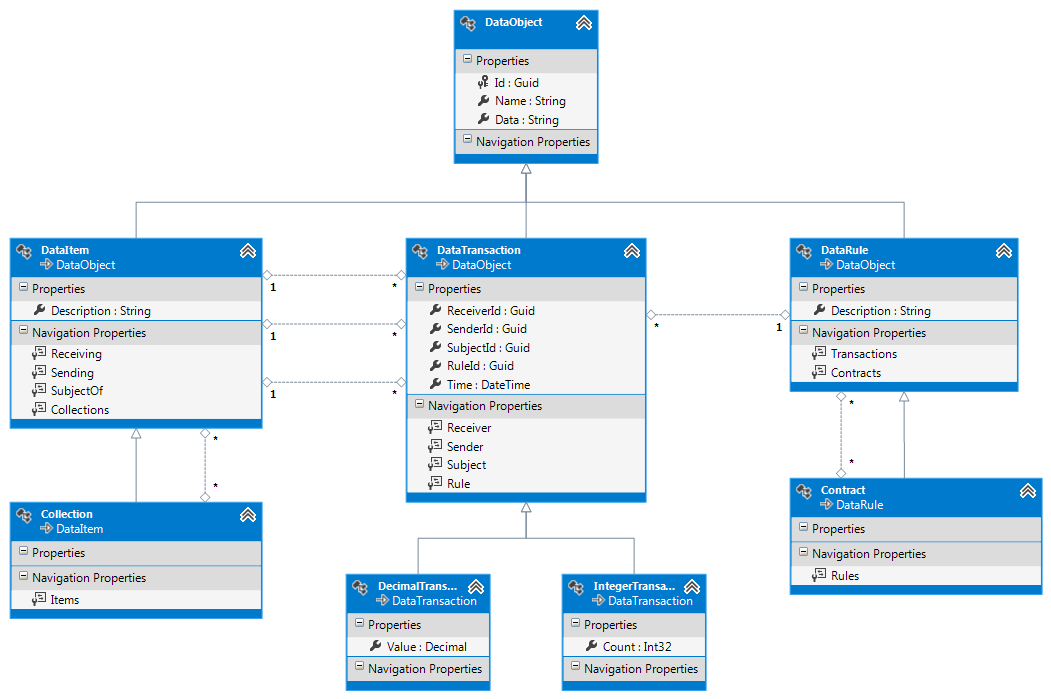
But now, my datamodel as created by Visual Studio 2012 by using the Entity Framework:EF-CART


So, what do you see?

  • The DataObject is the base class for any CART object. It has a unique identifier, a name that can be used to show the related object and a Data property that will contain an object as XML.
  • DataItem is a generic item class, containing an additional description just for more practical reasons. When a user wants to select an existing item, having a description makes it possible to avoid reading the object within the data.
  • The Collection table is just an item with an extra bonus. It can contain multiple child items without the need for any transactions. Actually, this is just a shortcut solution to allow more complex structures within your items. For example, you might create a complete Household collection containing husband, wife, four children and a dog. And although you could link them together by using transactions, having them in a collection just saves the need to create those transactions.
  • DataTransactions is the base class for the transactions, having a sender, receiver and subject item connected together. It also has a link to a rule and a timestamp, indicating when the transaction tool place. (Or will take place for future transactions.)
  • IntegerTransaction is just a basic transaction with a multiplier. This way, you don’t have to add a lot of transactions when your customer buys ten bags of flour.
  • DecimalTransaction is also a basic transaction that will handle items that can be traded in all kinds of different numbers, including fractional amounts. For example, the price of a product, or it’s weight, length or light intensity.
  • DataRule is the basic contract type. It’s a collection of transactions that are all related to one another. For example, the sale of a product would result in a sale rule.
  • The Contract class is more than just a rule. It’s a rule that can contain child rules, thus allowing structured contracts that are made up of several subcontracts. These are used when you have to deal with complex
    situations, like mortgages. A mortgage would include a rule for purchasing a house, a rule for lending money and paying it back, plus other rules for all kinds of insurances.

Now, as I’ve said before, this datamodel should offer me more than enough structural parts to use for my Garage Sale project. All I need to do is compile it and then just leave it alone. There should not be a need to include anything else.

Well, okay… That’s not completely true, since I might want to handle user accounts and store large images of products. But these things would actually require new database structures and should preferably be part of separate databases.

Looking back at this design, it surprises even me how less data it actually has. But the trick here is that I’ve separated the relationships between objects from the actual data itself. Each object can still contain a huge amount of data. But it’s just not important for the model itself.